- Generate encryption and HMAC keys with
fwknop --key-gen. - Transfer the keys you just generated fwknopd to the server (this is where SSHD is listening too).
- Start fwknopd and deploy a default-drop firewall policy against all inbound SSH connections.
- From anywhere on the Internet, use the fwknop client to send an SPA packets and have fwknopd open the firewall.
- Use your SSH client as usual now that you have access. No one else can even see that SSHD is listening.
- From spaclient generate encryption and HMAC keys along with the ssh access
request arguments to spaserver.domain.com. In the fwknop command
below the client IP '1.1.1.1' is used in the argument: '-a 1.1.1.1', and assumes
this IP is known to the user. This is the externally routable IP of the client system
(i.e. past any NAT device), and will certainly be different for your particular network.
Using the -a argument is the most secure method of generating an SPA packet since
it encrypts IP to be allowed through the remote firewall within the SPA packet vs. having
to trust the network layer header. The fwknop client can also resolve your externally
routable IP via the -R argument which causes fwknop to issue an HTTPS request (via
wget --secure-protocol ...) to an IP resolution script hosted on cipherdyne.org. However, if you are concerned about a local network admin or other entity discovering usage of the fwknop client through traffic analysis you should not use this option since DNS and HTTPS requests to cipherdyne.org are rather obvious.[spaclient]$ fwknop -A tcp/22 -a 1.1.1.1 -D spaserver.domain.com --key-gen --use-hmac --save-rc-stanza[+] Wrote Rijndael and HMAC keys to rc file: /home/mbr/.fwknoprc[spaclient]$ grep KEY /home/mbr/.fwknoprcKEY_BASE64 Sz80RjpXOlhH2olGuKBUamHKcqyMBsS9BTgLaMugUsg=HMAC_KEY_BASE64 c0TOaMJ2aVPdYTh4Aa25Dwxni7PrLo2zLAtBoVwSepkvH6nLcW45Cjb9zaEC2SQd03kaaV+Ckx3FhCh5ohNM5Q== - Transfer these keys to the fwknopd server system spaserver.domain.com using ssh or
other secure means before a default-drop policy is deployed. These keys are placed in the
/etc/fwknop/access.conffile in a stanza started with the SOURCE variable like so:[spaserver.domain.com]# cat /etc/fwknop/access.confSOURCE ANYREQUIRE_SOURCE_ADDRESS YKEY_BASE64 Sz80RjpXOlhH2olGuKBUamHKcqyMBsS9BTgLaMugUsg=HMAC_KEY_BASE64 c0TOaMJ2aVPdYTh4Aa25Dwxni7PrLo2zLAtBoVwSepkvH6nLcW45Cjb9zaEC2SQd03kaaV+Ckx3FhCh5ohNM5Q== - On spaserver.domain.com, start
fwknopdand deploy a default-drop firewall policy to block all incoming connections to the local SSH daemon. An example of such a policy can be found here: iptables policy script.[spaserver.domain.com]# service fwknop startfwknop start/running, process 4079[spaserver.domain.com]# cat iptables.policy | iptables-restore - Use the
fwknopclient from the spaclient system to send a valid SPA packet (encrypted, non-replayed, with an HMAC SHA-256) as required by theaccess.conffile on the server. We first show that SSHD cannot be scanned by Nmap beforefwknopis used since it is blocked by the default-drop firewall policy. Further, even after the SPA packet is sent by fwknop, SSHD can only be accessed by the IP contained within the decrypted SPA packet - it remains unscannable by everyone else.[spaclient]$ sudo nmap -sS -p 22 spaserver.domain.com[sudo] password for mbr:Starting Nmap 6.00 ( http://nmap.org ) at 2013-06-14 20:24 EDTNmap scan report for spaserver.domain.com (2.2.2.2)Host is up (0.00218s latency).PORT STATE SERVICE22/tcp filtered sshNmap done: 1 IP address (1 host up) scanned in 0.42 seconds[spaclient]$ fwknop -n spaserver.domain.com - Finally, access the SSH daemon with an SSH client as normal. The firewall policy on the SPA server is managed
by
fwknopd, and the rule to accept the incoming connection will be deleted after a configurable timeout but the connection will remain open by using a connection tracking mechanism provided by the firewall (iptables in this case):[spaclient]$ ssh -l mbr spaserver.domain.commbr@spaserver.domain.com's password:[spaserver.domain.com]$ hostnamespaserver.domain.com
spaclient (IP: 1.1.1.1) and
spaserver.domain.com (IP: 2.2.2.2). The SSH daemon along with iptables and
fwknopd are deployed on the spaserver.domain.com system, and the SSH and fwknop clients are
deployed on the spaclient system. This section assumes that fwknop has been installed properly
on both systems, and installation details can be found in the Installing fwknop
section below. Note this material is geared towards Linux systems, but equivalent deployments
are possible for ipfw and pf firewalls on FreeBSD, Mac OS X, and OpenBSD systems.
We'll use the following network diagram to serve as a reference throughout:
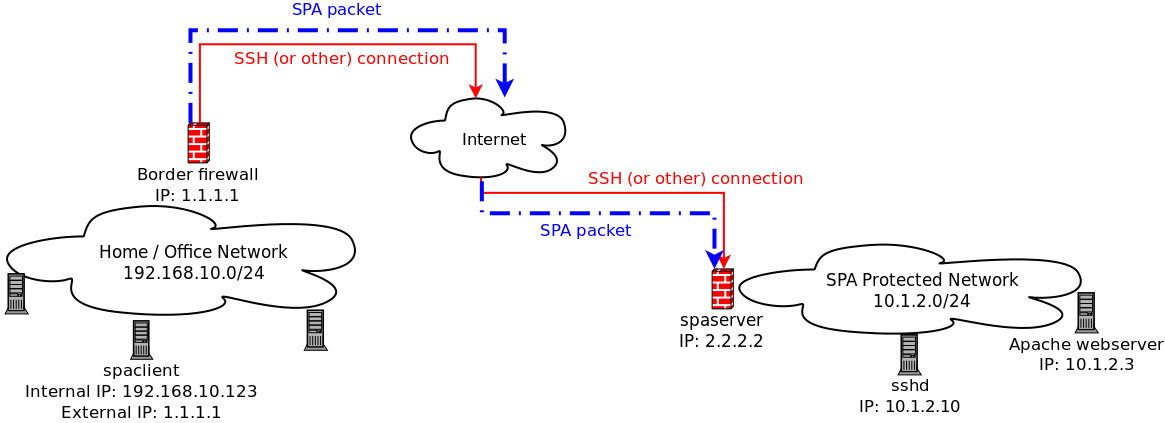
In the diagram above, the
spaclient is on a home/office network that is
behind a firewall. All packets sent out through this firewall are NAT'd to have source IP
1.1.1.1, and this is the IP that systems on the external Internet will see for
communications initiated by the spaclient system.
1.3 Default-Drop firewall policy Single Packet Authorization is designed to allow the local firewall to be configured in a "default drop" stance for a concealed service such as sshd. On the
spaserver
system we'll assume that eth0 is the external interface and connections
to sshd should be blocked on this interface. The following iptables commands accomplish
this, and are compatible with fwknopd.
[spaserver]# iptables -I INPUT 1 -i eth0 -p tcp --dport 22 -j DROP
[spaserver]# iptables -I INPUT 1 -i eth0 -p tcp --dport 22 -m conntrack --ctstate ESTABLISHED,RELATED -j ACCEPT
--verbose output
from the client along with syslog messages that are generated by the server. The command
prompt shows how we switch contexts back and forth between the spaclient and spaserver
systems, and comments are included below in blue. We start by viewing the
/etc/fwknop/access.conf on the spaserver
system to show the encryption and HMAC keys which were previously generated in the basic outline section
with the client --key-gen mode, and then move to spaclient system, run
fwknop, and gain access to SSH.
After
fwknopd has received the incoming SPA packet and has validated that 1)
the SPA packet has not been replayed, 2) it is properly authenticated via the HMAC,
3) the SPA packet has been encrypted with a key defined in the access.conf file so that
it is properly decrypted by fwknopd, and 4) the packet contains a request for
access that is authorized, then access is granted to SSHD. This is done
by adding an ACCEPT rule to the FWKNOP_INPUT chain for
the 1.1.1.1 IP to tcp/22 for 30 seconds before deleting it. From the
spaserver system, you can see the ACCEPT rule as well
as the messages fwknopd writes to syslog towards the end of the output below
which shows firewall rule addition and deletion after a 30 second time out. After the
ACCEPT rule is deleted, the original SSH connection remains open through
the use of the iptables conntrack module (this isn't displayed):
[spaserver.domain.com]# cat /etc/fwknop/access.conf
SOURCE ANY
REQUIRE_SOURCE_ADDRESS Y
KEY_BASE64 Sz80RjpXOlhH2olGuKBUamHKcqyMBsS9BTgLaMugUsg=
HMAC_KEY_BASE64 c0TOaMJ2aVPdYTh4Aa25Dwxni7PrLo2zLAtBoVwSepkvH6nLcW45Cjb9zaEC2SQd03kaaV+Ckx3FhCh5ohNM5Q==
[spaserver.domain.com]# service fwknop status
fwknop start/running, process 4079
--- Switching over to the client, we first scan for SSH and then run fwknop:
[spaclient]$ sudo nmap -sS -p 22 spaserver.domain.com
[sudo] password for mbr:
Starting Nmap 6.00 ( http://nmap.org ) at 2013-06-14 20:24 EDT
Nmap scan report for spaserver.domain.com (2.2.2.2)
Host is up (0.00218s latency).
PORT STATE SERVICE
22/tcp filtered ssh
Nmap done: 1 IP address (1 host up) scanned in 0.42 seconds
--- Note that -R below allows fwknop to automatically resolve the externally
--- routable IP of the spaclient system that was set up during the --key-gen
--- in the basic outline. The resolution is done via HTTPS by default.
--- ***IMPORTANT***: If you already know the source IP of the network where
--- the SPA packet will come from, then it is safer to just specify this IP
--- IP with '-a' instead of using '-R'. I.e., in this case, one could use
--- '-a 1.1.1.1'. We include this example for completeness.
[spaclient]$ fwknop -n spaserver.domain.com --verbose -R
[+] Resolved external IP (via '/usr/local/bin/wget --secure-protocol=auto --quiet -O - https://www.cipherdyne.org/cgi-bin/myip') as: 1.1.1.1
FKO Field Values:
=================
Random Value: 3166542531372213
Username: mbr
Timestamp: 1371262681
FKO Version: 2.0.2
Message Type: 1 (Access msg)
Message String: 1.1.1.1,tcp/22
Nat Access: <NULL>
Server Auth: <NULL>
Client Timeout: 0 (seconds)
Digest Type: 3 (SHA256)
HMAC Type: 3 (SHA256)
Encryption Type: 1 (Rijndael)
Encryption Mode: 2 (CBC)
Encoded Data: 3166542531372213:bWJy:1371262681:2.0.2:1:NTAuNzYuMTUuMTcwLHRjcC8yMg
SPA Data Digest: jyiIo5ICRapo72UCjsHqFDipR4P4teAyyYI5W9sTe10
HMAC: 1VTsf4E2vlPP7Kum94SfyRJzAYwl86LVMQtt7H0/zP0
Plaintext: 3166542531372213:bWJy:1371262681:2.0.2:1:NTauNzYuMaUuMTcwLHajcC8yMg:jyiIo5ICRapo72UCjsHqFDipR4PateAyyYI5W9sTe10
Final Packed/Encrypted/Encoded Data:
8rqjaO4SdW4Yaf1grhi0f3pcdcWO6ZpRxnduxHwJ/5zcqne0VCrZ8oibPYiwazGCOJ7HhGy+f2ju2mVz//DnIr4qKYf48gqe0QJz14Y6Z7BQCYdJdwyYz+hTo9Z41tOA788VcK7sK2XJjdPQL0C794QqEFAqCOyno1VTsf4E2vlPP7Kum94SfyRJzAYwl86LVMQtt7H0/zP0
Generating SPA packet:
protocol: udp
source port: <OS assigned>
destination port: 62201
IP/host: spaserver.domain.com
send_spa_packet: bytes sent: 204
--- With the SPA packet sent, we now have access to SSHD:
[spaclient]$ ssh -l mbr spaserver.domain.com
mbr@spaserver.domain.com's password:
[spaserver.domain.com]$ hostname
spaserver.domain.com
[spaserver.domain.com]$ sudo fwknopd --fw-list
Listing rules in fwknopd iptables chains...
Chain FWKNOP_INPUT (1 references)
num target prot opt source destination
1 ACCEPT tcp -- 1.1.1.1 0.0.0.0/0 tcp dpt:22 /* _exp_1348326362 */
--- These are syslog messages written by fwknopd indicating firewall rule manipulations:
[spaserver.domain.com]$ sudo grep fwknopd /var/log/syslog
Jun 22 10:50:32 spaserver fwknopd[4079]: (stanza #1) SPA Packet from IP: 1.1.1.1 received with access source match
Jun 22 10:50:32 spaserver fwknopd[4079]: Added Rule to FWKNOP_INPUT for 1.1.1.1, tcp/22 expires at 1348326362
Jun 22 10:51:02 spaserver fwknopd[4079]: Removed rule 1 from FWKNOP_INPUT with expire time of 1348326362.
--- After the ACCEPT rule is deleted on spaserver, back on the client
--- SSHD is once again no longer scannable, and it is never scannable
--- by any IP that cannot construct a valid SPA packet:
[spaclient]$ nmap -P0 -n -p 22 spaserver
Starting Nmap 5.00 ( http://nmap.org ) at 2013-06-22 10:50 EDT
Interesting ports on 2.2.2.2:
PORT STATE SERVICE
22/tcp filtered ssh
Nmap done: 1 IP address (1 host up) scanned in 2.10 seconds
eth0. If you are running
fwknopd on different platform such as FreeBSD or OpenBSD you will want to set the
PCAP_INTF to the appropriate
interface name. There are many variables in the /etc/fwknop/fwknopd.conf
file, but most are set to sensible defaults. As an illustration, here is the
PCAP_INTF variable and it is set to eth0:
[spaserver]# grep PCAP_INTF /etc/fwknop/fwknopd.conf
PCAP_INTF eth0;
PCAP_FILTER variable in the fwknopd.conf
file and restarting fwknopd. To confirm that fwknopd is sniffing the network,
after start up it writes a few messages to syslog as follows along with the bpf filter:
[spaserver]# grep fwknopd /var/log/syslog
Jun 22 20:40:59 spaserver fwknopd[4079]: Starting fwknopd
Jun 22 20:40:59 spaserver fwknopd[4079]: Added jump rule from chain: INPUT to chain: FWKNOP_INPUT
Jun 22 20:40:59 spaserver fwknopd[4079]: PCAP filter is: udp port 62201
Jun 22 20:40:59 spaserver fwknopd[4079]: Starting fwknopd main event loop.
Users of firewalls find value in the idea that traffic to a service can be blocked from all but a few pre-defined networks according to the firewall policy. Few people question whether this is valuable from a security perspective - firewalls generally enhance security (the occasional firewall vulnerability not withstanding). The PK/SPA strategy extends the notion of filtering traffic for a set of services by adding a lightweight crypto layer to allow temporary access from networks that cannot be anticipated when the firewall policy is written. This provides service concealment by default, and the SPA strategy asserts that there is value in this.
There are many people looking for vulnerabilities in server software, and when a clever person finds a brand new 0-day vulnerability, this person has the opportunity to use it for good or ill. If the person chooses the later and wants to exploit the vulnerability, then one of the first steps is to find a list of targets. If an exploit applies to a piece of server software (such as an SSH daemon) that typically runs on a particular port (tcp/22 in this case), then a common technique for identifying suitable targets is to use nmap to conduct a port sweep across many networks looking for SSH servers listening on port 22. With SPA deployed, anyone building such a list of targets will not be able to include your system in their list. Both PK and SPA are designed to conceal server software behind a default-drop packet filter and are not effective at protecting against client-side exploits (such as an attack for a vulnerability in a web browser). 2.1 What is Port Knocking? Port knocking is defined as the communication of authentication information over closed (or at least logged) ports, together with the dynamic reconfiguration of a default-drop firewall policy to allow access to services that would otherwise be blocked. The goal of port knocking is to provide a simplistic mechanism by which a remote user can be authenticated before access is granted to a service such as an SSH daemon. The basic architecture is that a port knocking client generates a series of packets to a set of ports which are logged on a port knocking server, and if this series of ports builds a proper sequence then access will be granted to the requested service. Port knocking, in contrast to most Single Packet Authorization implementations, uses packet headers instead of packet payloads to communicate authentication information. A port knock sequence can be a simple shared sequence of ports, or it can be more advanced and involve encryption and passive OS fingerprinting. 2.2 What is Single Packet Authorization? Single Packet Authorization (SPA) is defined similarly to port knocking, except that instead of just using packet headers, SPA communicates authentication information within the payload portion of a single packet. Because packet payloads are used, SPA offers many enhancements over PK such as stronger usage of cryptography, protection from replay attacks, minimal network footprint (in terms of what IDS's may alert on - PK sequences look like port scans after all), the ability to transmit full commands and complex access requests, and better performance. Some additional information on why SPA is an important security technology can be found in this blog post. Although SPA is referred to in this document as Single Packet Authorization, fwknop really performs both authentication and authorization, which are not the same thing. "Authentication" is the process of proving who you are, whereas "authorization" is the process of determining whether someone is allowed to perform an operation. 2.3 What is fwknop? fwknop is free and open source software that supports Single Packet Authorization. The fwknop server supports iptables firewalls on Linux (including firewalld as well on recent Fedora, RHEL, and CentOS systems), ipfw firewalls on FreeBSD and Mac OS X, and pf on OpenBSD. The fwknop client runs on Linux, Mac OS X, *BSD, and Windows systems (either under Cygwin or using the Cross-Platform UI). Current versions of fwknop are written in C, but there are older versions that are written in perl. These older versions support port knocking, but this has been deprecated in favor of SPA in the C versions. When fwknop was first released in 2004, it was the first software implementation that combined port knocking with passive OS fingerprinting to add an additional authentication parameter to port knock sequences. In May of 2005, the first version of fwknop that supported full SPA mode communications (with encrypted and non-replayable payloads) was released, and the development pace has remained strong ever since. A new release is made on average every few months, and there is a healthy list of contributors who suggest features and write patches to the fwknop code. As of November 2008, fwknop is available as a Debian package for Debian and Ubuntu systems (thanks to Franck Joncourt), and as an RPM for Red Hat and Fedora systems (thanks to Mirek Trmac). All fwknop source code is versioned within git. 2.4 fwknop License (GPL v2) fwknop is released as open source software under the terms of the GNU Public License (GPL) version 2. For reference, the full text of the GPL can be downloaded from the Free Software Foundation. There are no plans at the present time to change the licensing terms of fwknop to a different license (such as GPL v3 or a BSD license), but this may change at any time without notice. However, fwknop will always remain an open source project free for use by anyone subject to the terms of the license.
In March 2005, a patent for SPA was filed with the US Patent and Trademark Office, and the patent was officially issued in April, 2013. The patent was filed mostly as a defensive measure so that it would be more difficult for a patent troll to inflict damage upon the development of fwknop. Open source projects need to protect themselves as aggressively as possible in an uncertain legal climate that makes frivolous patent litigation an expensive proposition. 3. Installing fwknop 3.1 Dependencies The fwknop client and server require libfko which is normally included with both source and binary distributions, and is a dedicated library developed by the fwknop project. In addition, whenever the fwknopd server is used, libpcap is a required dependency unless fwknopd is deployed in UDP listener mode. In this mode (available as of the 2.6.4 release), even though fwknopd binds to a UDP port, SPA packets are never acknowledged so from an attacker’s perspective there is no difference between fwknopd sniffing the wire passively vs. listening on a UDP socket in terms of what can be scanned for.
For GPG functionality, GnuPG must also be correctly installed and configured along with the libgpgme library.
To take advantage of all of the authentication and access management features of the fwknopd daemon/service a functioning iptables, ipfw, or pf firewall is required on the underlying operating system.
In summary, fwknop dependencies are described by the following table. Note that the installation of libpcap and libgpgme are best accomplished with the package management system used by your operating system, and the naming conventions for these dependencies can vary. For example, on Debian/Ubuntu, these libraries are installed via the
libpcap-dev and
libgpgme11-dev packages.
| Dependency | fwknop Client | fwknopd Server |
|---|---|---|
| libpcap | N/A | optional (not required in UDP server mode) |
| libgpgme | optional | optional |
| libfko | required | required |
| iptables/ipfw/pf | N/A | required |
CREDITS file.
| Component / Technology | Fedora/RHEL/CentOS | Debian/Ubuntu | OpenWRT | FreeBSD | Mac OS X | OpenBSD | iPhone | Android | Cygwin | Windows |
|---|---|---|---|---|---|---|---|---|---|---|
| fwknop client | Y | Y | Y | Y | Y | Y | Y | Y | Y | Y |
| fwknopd server | Y | Y | Y | Y | Y | Y | N | N | N | N |
| GnuPG Support | Y | Y | Y | Y | Y | Y | N | N | N | N |
| HMAC Support | Y | Y | Y | Y | Y | Y | N | Y | Y | N |
| Client NAT Access Support | Y | Y | Y | N | N | N | N | Y | Y | N |
| fwknopd Server-Side NAT | Y | Y | Y | N | N | N | N/A | N/A | N/A | N |
| Native Windows binary (client) | N/A | Y | ||||||||
| libfko library | Y | Y | Y | Y | Y | Y | Y | Y | Y | Y |
| perl libfko bindings | Y | Y | Y | Y | Y | Y | N | N | Unknown | Unknown |
| python libfko bindings | Y | Y | Y | Y | Y | Y | N | N | Unknown | Unknown |
comment" match in order to store the expiration time for
new ACCEPT rules upon receiving a valid SPA packet. At init time, fwknopd
verifies whether the comment match is available, and then uses it as follows
for new rules. Note that all new rules are added by fwknopd to the FWKNOP_INPUT
chain to ensure separation with the rest of the iptables policy.
/sbin/iptables -t filter -A FWKNOP_INPUT -p 6 -s 1.1.1.1 --dport 22 -m comment --comment _exp_1348688232 -j ACCEPT
fwknop client, server, and libfko library all function properly on FreeBSD systems.
Note that fwknopd maintains rule expiration times via ipfw
"// _exp_<expire_time>" comments, and rules added by fwknopd
go into set 1 by default (see the IPFW_ACTIVE_SET_NUM variable
in the /etc/fwknop/fwknopd.conf file).
/sbin/ipfw add 10000 set 1 pass 6 from 1.1.1.1 to me dst-port 22 setup keep-state // _exp_1346784046
ipfw
on Mac OS X vs. ipfw on FreeBSD. These differences are handled
by this patch,
which changes how fwknopd deals with ipfw sets on Mac OS X vs. FreeBSD.
3.4.4 OpenBSD
On OpenBSD, the fwknopd server makes use of a dedicated pf anchor
to which fwknopd will add and delete rules. This anchor must be linked into the
pf policy (typically done by adding it into the /etc/pf.conf file),
and fwknopd runs a check at init time to ensure that the anchor exists. The
PF_ANCHOR_NAME variable in the /etc/fwknop/fwknopd.conf
config file controls the name of the anchor, with the default being set as follows:
PF_ANCHOR_NAME fwknop;
pf "label"
capability to mark new rules with an expiration time.
3.4.5 iPhone
There is an fwknop iPhone client, but is has not yet been uploaded to the Apple iStore. In addition,
it does not yet support the encryption of SPA packets with GnuPG, but Rijndael mode works just fine. However, the new
HMAC mode is not yet supported.
3.4.6 Android
There is an fwknop Android client, and similarly to the
iPhone the Android client supports Rijndael for SPA packet encryption but not yet GnuPG.
There is a new release of the Android client as of June, 2015 developed by Jonathan Bennett
that includes support for HMAC authenticated encryption, base64 encoded keys, saving
configurations, and more. This release supports Android-4.4, and is built against
the latest fwknop release (2.6.6 as of this writing). The Android fwknop client is
available on github, and will be
available in the Google Play store soon.
3.4.7 Windows
Support on Windows is in the form of a native Windows fwknop client binary along with the
libfko code being portable to Windows. The client is also known to work under
Cygwin, and there is a UI as well. However, GnuPG support is not yet functional.
In addition, there are no current plans to support a Windows firewall in fwknopd, but theoretically
it could be developed. To get the fwknop client installed under Cygwin, the autoconf
configure requires the --disable-server argument.
3.5 Installing from Sources
As of this writing, the latest release of fwknop is 2.6.8, and compiling and
installing fwknop is easily done via the following steps. Note that this will result
in fwknopd configuration files being installed in /etc/fwknop/ along with normal
binaries in /usr/bin/ and /usr/sbin/ (most command output removed
for brevity). Also, the GnuPG signature for the fwknop-2.6.8.tar.gz tarball is verified
(always do this!) using the key available here - you'll need to
import this key with "$ gpg --import <key file>" if it is not already
on your GnuPG keyring.
[spaserver]$ wget http://www.cipherdyne.org/fwknop/download/fwknop-2.6.8.tar.gz
[spaserver]$ wget http://www.cipherdyne.org/fwknop/download/fwknop-2.6.8.tar.gz.asc
[spaserver]$ gpg --verify fwknop-2.6.8.tar.gz.asc
gpg: Signature made ... using DSA key ID 0D3E7410
gpg: Good signature from "Michael Rash (Signing key for cipherdyne.org projects) <mbr@cipherdyne.org>"
[spaserver]$ tar xfz fwknop-2.6.8.tar.gz
[spaserver]$ cd fwknop-2.6.8
[spaserver]$ ./configure --prefix=/usr --sysconfdir=/etc && make
checking build system type... x86_64-unknown-linux-gnu
checking host system type... x86_64-unknown-linux-gnu
checking target system type... x86_64-unknown-linux-gnu
checking for a BSD-compatible install... /usr/bin/install -c
checking whether build environment is sane... yes
...
/bin/bash ../libtool --tag=CC --mode=compile gcc -DHAVE_CONFIG_H -I. -I.. -g -O2 -Wall -fstack-protector-all -fstack-protector -fPIE -pie -D_FORTIFY_SOURCE=2 -MT base64.lo -MD -MP -MF .deps/base64.Tpo -c -o base64.lo base64.c
libtool: compile: gcc -DHAVE_CONFIG_H -I. -I.. -g -O2 -Wall -fstack-protector-all -fstack-protector -D_FORTIFY_SOURCE=2 -MT base64.lo -MD -MP -MF .deps/base64.Tpo -c base64.c -fPIC -DPIC -o .libs/base64.o
libtool: compile: gcc -DHAVE_CONFIG_H -I. -I.. -g -O2 -Wall -fstack-protector-all -fstack-protector -D_FORTIFY_SOURCE=2 -MT base64.lo -MD -MP -MF .deps/base64.Tpo -c base64.c -fPIE -pie -o base64.o >/dev/null 2>&1
...
[spaserver]$ su
Password:
[spaserver]# make install
Making install in lib
make[1]: Entering directory `/home/mbr/git/fwknop.git/lib'
make[2]: Entering directory `/home/mbr/git/fwknop.git/lib'
test -z "/usr/lib" || /bin/mkdir -p "/usr/lib"
/bin/bash ../libtool --mode=install /usr/bin/install -c libfko.la '/usr/lib'
libtool: install: /usr/bin/install -c .libs/libfko.so.2.0.3 /usr/lib/libfko.so.2.0.3
libtool: install: (cd /usr/lib && { ln -s -f libfko.so.2.0.3 libfko.so.2 || { rm -f libfko.so.2 && ln -s libfko.so.2.0.3 libfko.so.0; }; })
...
[spaserver]# which fwknop
/usr/bin/fwknop
[spaserver]# fwknop -V
fwknop client 2.6.8, FKO protocol version 2.0.2
[spaserver]# which fwknopd
/usr/sbin/fwknopd
[spaserver]# fwknopd -V
fwknopd server 2.6.8
make install, it is recommended to run
the fwknop test suite to make sure that fwknop seems to operate
normally on your system.
If fwknop is supported by your OS package management system, you may want to install using it instead. For example, on Ubuntu systems, you can install via:
[spaclient]# apt-get install fwknop-client
[spaserver]# apt-get install fwknop-server
test/ directory). Nearly every
aspect of fwknop operations is examined and verified by the test suite. In
this section we'll examine test suite operations and show how it can be used
in the development of new fwknop features and functionality. In general, when
a new feature is developed, a corresponding test or set of tests is added to the
test suite to ensure proper implementation. This same process also applies to
bug fixes. Over time, the fwknop test suite has achieved a high level of code
coverage - nearly 90% of all lines and 100% of all functions are exercised by
the test suite for the fwknop-2.6.5 release (see the
gcov code coverage report).
3.6.1 Running the Test Suite
When installing fwknop on any system it is recommended to run the test suite to
verify that run time aspects of fwknop work properly. The test suite can be
executed before the final "make install" step in the installation process.
This way, if the test suite indicates there are critical problems after fwknop
has been compiled (unlikely assuming that fwknop is being installed on a supported
platform), then the installation can be aborted and bugs filed before binaries
have been installed in important filesystem locations. After compilation with
"./configure --prefix=/usr ... && make" the test suite can be run as
follows from the test/ directory. Note that this must be done as root,
and in this particular case we also instruct the test suite to enable all possible
tests, which includes running fwknop through valgrind, comparing encryption and
HMAC data against OpenSSL, and more:
[spaserver]# cd fwknop-2.6.8/test/
[spaserver]# ./test-fwknop.pl --enable-all
[+] Starting the fwknop test suite...
args: --enable-all
Saved results from previous run to: output.last/
[+] Total test buckets to execute: 679
[recompilation] recompile and look for compilation warnings.........pass (1)
[make distcheck] ensure proper distribution creation................pass (2)
[Makefile.am] test suite conf/ files included.......................pass (3)
[build] [client] binary exists......................................pass (4)
[build security] [client] Position Independent Executable (PIE).....pass (5)
[build security] [client] stack protected binary....................pass (6)
[build security] [client] fortify source functions..................pass (7)
[build security] [client] read-only relocations.....................pass (8)
[build security] [client] immediate binding.........................pass (9)
[build] [server] binary exists......................................pass (10)
[build security] [server] Position Independent Executable (PIE).....pass (11)
[build security] [server] stack protected binary....................pass (12)
[build security] [server] fortify source functions..................pass (13)
[build security] [server] read-only relocations.....................pass (14)
[build security] [server] immediate binding.........................pass (15)
[build] [libfko] binary exists......................................pass (16)
[build security] [libfko] stack protected binary....................pass (17)
[build security] [libfko] fortify source functions..................pass (18)
[build security] [libfko] read-only relocations.....................pass (19)
[build security] [libfko] immediate binding.........................pass (20)
...
[Rijndael] [client+server] complete cycle (tcp/22 ssh)..............pass (99)
[Rijndael] [client+server] use of encryption key with fd 0..........pass (100)
[Rijndael] [client+server] use of encryption key with stdin.........pass (101)
[Rijndael] [client+server] localhost hostname->IP (tcp/22 ssh)......pass (102)
[Rijndael] [client+server] rotate digest file.......................pass (103)
[Rijndael] [client] --save-packet run/tmp_spa.pkt...................pass (104)
[Rijndael] [client] --last-cmd......................................pass (105)
...
[Rijndael] [FUZZING] non-base64 altered SPA data....................pass (211)
[Rijndael] [FUZZING] base64 altered SPA data........................pass (212)
[Rijndael] [FUZZING] appended data to SPA pkt.......................pass (213)
[Rijndael] [FUZZING] prepended data to SPA pkt......................pass (214)
...
[Rijndael+HMAC] [client+server] complete cycle (tcp/22 ssh).........pass (221)
[Rijndael+HMAC] [client+server] iptables custom input chain.........pass (222)
[Rijndael+HMAC] [client+server] --get-hmac-key (tcp/22 ssh).........pass (223)
[Rijndael+HMAC] [client+server] iptables - no flush at init.........pass (224)
[Rijndael+HMAC] [client+server] iptables - no flush at exit.........pass (225)
[Rijndael+HMAC] [client+server] iptables - no flush at init or exit.pass (226)
...
[Rijndael] [client->server OS compatibility] v2.5 Ubuntu-12.04......pass (275)
[Rijndael] [client->server OS compatibility] v2.5 Ubuntu-13.04......pass (276)
[Rijndael] [client->server OS compatibility] v2.5 FreeBSD-8.2.......pass (277)
[Rijndael] [client->server OS compatibility] v2.5 OpenBSD-4.9.......pass (278)
[Rijndael+HMAC] [client->server OS compatibility] v2.5 Ubuntu-12.04.pass (279)
[Rijndael+HMAC] [client->server OS compatibility] v2.5 Ubuntu-13.04.pass (280)
[Rijndael+HMAC] [client->server OS compatibility] v2.5 FreeBSD-8.2..pass (281)
[Rijndael+HMAC] [client->server OS compatibility] v2.5 OpenBSD-4.9..pass (282)
...
[GPG+HMAC] [client+server] pinentry not required....................pass (357)
[GPG+HMAC] [client+server] complete cycle (tcp/22 ssh)..............pass (358)
[GPG+HMAC] [client+server] gpg args from rc file....................pass (359)
[GPG+HMAC] [client+server] complete cycle (tcp/23 telnet)...........pass (360)
[GPG+HMAC] [client+server] complete cycle (tcp/9418 git)............pass (361)
[GPG+HMAC] [client+server] complete cycle (tcp/60001 git)...........pass (362)
[GPG+HMAC] [client+server] complete cycle (udp/53 dns)..............pass (363)
[GPG+HMAC] [client+server] replay attack detection..................pass (364)
[GPG+HMAC] [client+server] detect replay #1 (GnuPG prefix)..........pass (365)
[valgrind] [fko-wrapper] multiple libfko calls......................pass (366)
[valgrind output] [flagged functions] ..............................pass (367)
Run time: 51.00 minutes
[+] 10563/0/10563 OpenSSL tests passed/failed/executed
[+] 4556/0/4556 OpenSSL HMAC tests passed/failed/executed
[+] 4559/0/4559 Fuzzing tests passed/failed/executed
[+] 367/0/367 test buckets passed/failed/executed
fwknop_test.tar.gz
to Michael Rash <mbr[at]cipherdyne.org> for analysis. Alternatively you can also post it
somewhere where it can be downloaded. Here is some sample
output that shows a few test failures:
[spaserver]# ./test-fwknop.pl --diff
...
[build security] [libfko] immediate binding.........................fail (20)
[preliminaries] [client] usage info.................................pass (21)
[preliminaries] [client] getopt() no such argument..................pass (22)
[preliminaries] [client] --test mode, packet not sent...............pass (23)
[preliminaries] [client] expected code version......................fail (24)
...
[perl FKO module] [HMAC encrypt/decrypt] libfko complete cycle......fail (210)
...
[+] 200/21/221 test buckets passed/failed/executed
[spaserver]# ./test-fwknop.pl --diff
output/ directory to output.last
and then diff's each file between the two runs in --diff mode. In the process,
it tries to match output files to each other to account for differences in how the test
suite is invoked across the runs (such as if different --include or
--exclude criteria is provided). Using this mode, the typical workflow
becomes 1) run the test suite, 2) hack on the fwknop code and recompile, 3) run the test
suite in --diff mode, 4) commit the changes if everything is in order. This
allows the test suit to help validate changes before they make it into the code base. A
similar work flow exists for --enable-valgrind mode below.
3.6.4 valgrind Support
The test suite is able to run all tests underneath the excellent
valgrind dynamic analysis tool with the
--enable-valgrind command line argument.
[spaserver]# ./test-fwknop.pl --enable-valgrind
44 bytes in 1 blocks are definitely lost in loss record 2 of 2
at 0x482BE68: malloc (in /usr/lib/valgrind/vgpreload_memcheck-x86-linux.so)
by 0x490EA50: strdup (strdup.c:43)
by 0x10CD69: incoming_spa (incoming_spa.c:162)
by 0x10E000: process_packet (process_packet.c:200)
by 0x4862E63: ??? (in /usr/lib/i386-linux-gnu/libpcap.so.1.1.1)
by 0x4865667: pcap_dispatch (in /usr/lib/i386-linux-gnu/libpcap.so.1.1.1)
by 0x10DABF: pcap_capture (pcap_capture.c:226)
by 0x10A798: main (fwknopd.c:299)
-Wall
and with valgrind enabled. Then by applying --diff mode across these runs it
becomes easier to verify whether new code is properly developed. Here is an example where
a code change got rid of a valgrind warning - you can see the warning removed from the
output/42.test file:
[spaserver]# ./test-fwknop.pl --enable-recompile --enable-valgrind
--- make code changes, and then:
[spaserver]# ./test-fwknop.pl --enable-recompile --enable-valgrind
[spaserver]# ./test-fwknop.pl --diff
[+] Checking: [Rijndael SPA] [client+server] complete cycle (tcp/22 ssh)
--- output.last/42.test 2012-10-04 21:36:17.660155003 -0400
+++ output/42.test 2012-10-04 21:36:17.692155003 -0400
@@ -5,30 +5,14 @@
Using Valgrind-3.7.0 and LibVEX; rerun with -h for copyright info
Command: ../client/.libs/fwknop -A tcp/22 -a 127.0.0.2 -D 127.0.0.1 --get-key local_spa.key --verbose --verbose
-Invalid read of size 4
- at 0x4E37DF4: fko_encrypt_spa_data (fko_encryption.c:65)
- by 0x10B036: main (fwknop.c:292)
- Address 0x583c3fc is 108 bytes inside a block of size 110 alloc'd
- at 0x4C2B6CD: malloc (in /usr/lib/valgrind/vgpreload_memcheck-amd64-linux.so)
- by 0x4E37DA8: fko_encrypt_spa_data (fko_encryption.c:56)
- by 0x10B036: main (fwknop.c:292)
-
-Invalid read of size 4
- at 0x4E37E47: fko_encrypt_spa_data (fko_encryption.c:69)
- by 0x10B036: main (fwknop.c:292)
- Address 0x583c3fc is 108 bytes inside a block of size 110 alloc'd
- at 0x4C2B6CD: malloc (in /usr/lib/valgrind/vgpreload_memcheck-amd64-linux.so)
- by 0x4E37DA8: fko_encrypt_spa_data (fko_encryption.c:56)
- by 0x10B036: main (fwknop.c:292)
-
send_spa_packet: bytes sent: 161
--Anonymize-results command line argument:
[spaserver]# ./test-fwknop.pl --Anonymize-results
[+] Anonymizing all IP addresses and hostnames from output files...
Creating tar file: test_fwknop.tar.gz
test.log
output/
output/1.test
output/test.log
output/1_fwknopd.test
...
output/init
[+] Anonymized test results file: test_fwknop.tar.gz, you can send
this file to mbr@cipherdyne.org for diagnosis.
test_fwknop.tar.gz can be safely shared with others, though it is recommended to
review the information it contains just to be sure that nothing sensitive made it through. The
anonymization step sets all IPv4 addresses to "N.N.N.N" and removes hostnames from uname
output. Typically the test_fwknop.tar.gz file is sent to an fwknop developer
for review whenever a test fails.
4. fwknop Operations
This section covers general operations of fwknop. It is assumed that fwknop has been
installed on both the spaclient (IP: 1.1.1.1) and
spaserver (IP: 2.2.2.2) systems so that proper operations can be illustrated.
Also, in this section we generally show fwknopd execution on Ubuntu Linux, but analogous
operations apply to other supported platforms.
4.1 SPA with HMAC and Symmetric Keys (via Rijndael)
This section illustrates gaining access to two different services, sshd and IMAP over SSL
with SPA using symmetric encryption keys via the Rijndael cipher along with a SHA-256
HMAC. We configure fwknopd to sniff eth0 via the /etc/fwknop/fwknopd.conf file on the
spaserver system, and we also use the same Rijndael and HMAC keys as in the Quick Start section.
However, we add one new variable OPEN_PORTS allow SPA clients to request access
to tcp/22 (ssh) or tcp/993 (IMAPS), but nothing else.
[spaserver]# grep PCAP_INTF /etc/fwknop/fwknopd.conf
PCAP_INTF eth0;
[spaserver.domain.com]# cat /etc/fwknop/access.conf
SOURCE ANY
OPEN_PORTS tcp/22, tcp/993
REQUIRE_SOURCE_ADDRESS Y
KEY_BASE64 Sz80RjpXOlhH2olGuKBUamHKcqyMBsS9BTgLaMugUsg=
HMAC_KEY_BASE64 c0TOaMJ2aVPdYTh4Aa25Dwxni7PrLo2zLAtBoVwSepkvH6nLcW45Cjb9zaEC2SQd03kaaV+Ckx3FhCh5ohNM5Q==
[spaserver]# iptables -I INPUT 1 -i eth0 -p tcp --dport 22 -j DROP
[spaserver]# iptables -I INPUT 1 -i eth0 -p tcp --dport 993 -j DROP
[spaserver]# iptables -I INPUT 1 -i eth0 -p tcp -m conntrack --ctstate ESTABLISHED,RELATED -j ACCEPT
spaclient system we run the fwknop client in order to gain
access to both SSHD and IMAPS simultaneously. Note that we use the same Rijndael and
HMAC keys as defined in the Quick Start section, but we override the
original -A tcp/22 access request with a new one from the command line:
[spaclient]$ fwknop -A tcp/22,tcp/993 -n spaserver.domain.com
[spaclient]$ ssh mbr@spaserver
mbr@spaserver's password:
/etc/fwknop/access.conf file since
fwknopd must be able to decrypt messages that have been encrypted by an fwknop
client with the server's public key. Hence, it is not a good idea to use a
highly valuable personal GnuPG key on the server. It is also possible to create GnuPG keys on
the server with no password and then set "GPG_ALLOW_NO_PW Y" in the
access.conf file. While this may sound like a bad idea, in automated environments
it makes sense because "there is usually no way to store a password more securely than on the
secret keyring itself" according to:
https://www.gnupg.org/faq/gnupg-faq.html#automated_use.
Using this feature and removing the passphrase from a GnuPG key pair is also useful in some
environments where libgpgme is forced to use gpg-agent and/or pinentry to collect a passphrase.
In order for fwknop to support SPA via GnuPG you will need the
libgpgme library
installed. When compiling fwknop, the autoconf configure script automatically
detects whether libgpgme is installed, and if so, it compiles in GnuPG support by
default.
Once you have created the requisite keys as shown below, you will need to import and sign each key into its "opposite" system. That is, import and sign the server key into the client's GnuPG key ring, and vice-versa. Because SPA messages must fit within a single IP packet, it is recommended to choose a key size of 2048 bits or less for the fwknopd server GnuPG key. Technically, you can use a 4096-bit server key as long as the client key is 2048-bits or less (and vice versa). The general rule of thumb here is that if one key is 4096-bits large, then the other will need to be 2048-bits or less. Note that if both the client and server keys are 4096-bits, then you can add a 2048-bit signing key to the client GnuPG keyring (as the last key) and use it for SPA operations.
The process of generating the necessary GnuPG keys from the perspectives of both the client and server is outlined below. First we generate GnuPG keys and then export them to ascii files:
[spaserver]# gpg --gen-key
[spaserver]# gpg --list-keys
pub 1024D/ABCD1234 2012-05-01
uid fwknop server key <fwknopd@spaserver>
sub 2048g/EFGH1234 2012-05-01
[spaserver]# gpg -a --export ABCD1234 > server.asc
--- now from the spaclient system:
[spaclient]$ gpg --gen-key
[spaclient]$ gpg --list-keys
pub 1024D/1234ABCD 2012-05-01
uid fwknop client key <fwknop@spaclient>
sub 2048g/1234EFGH 2012-05-01
[spaclient]$ gpg -a --export 1234ABCD > client.asc
[spaclient]$ scp client.asc root@spaserver:
[spaclient]$ scp root@spaserver:server.asc .
[spaserver]# gpg --import client.asc
[spaserver]# gpg --edit-key 1234ABCD
Command> sign
[spaclient]$ gpg --import server.asc
[spaclient]$ gpg --edit-key ABCD1234
Command> sign
/etc/fwknop/access.conf file so that fwknopd uses GnuPG to verify and decrypt SPA
packets and are signed and encrypted with GnuPG. Note that the server key ID is ABCD1234
and the client key ID is 1234ABCD:
[spaserver]# cat /etc/fwknop/access.conf
SOURCE ANY
OPEN_PORTS tcp/22
REQUIRE_SOURCE_ADDRESS Y
GPG_REMOTE_ID 1234ABCD;
GPG_DECRYPT_ID ABCD1234;
GPG_DECRYPT_PW <your decryption password> ### or set GPG_ALLOW_NO_PW and remove the passphrase
HMAC_KEY_BASE64 c0TOaMJ2aVPdYTh4Aa25Dwxni7PrLo2zLAtBoVwSepkvH6nLcW45Cjb9zaEC2SQd03kaaV+Ckx3FhCh5ohNM5Q==
GPG_HOME_DIR /root/.gnupg
FW_ACCESS_TIMEOUT 30
[spaserver]# service fwknop restart
fwknop stop/waiting
fwknop start/running, process 12624
~/.fwknoprc file:
[spaclient]$ fwknop -A tcp/22 --gpg-recip ABCD1234 --gpg-sign 1234ABCD -a 1.1.1.1 -D spaserver.domain.com --save-rc-stanza
Enter passphrase for signing:
[spaclient]$ ssh -l mbr spaserver
mbr@spaserver's password:
~/.fwknoprc file and do one of three things:
- Delete the
KEY_BASE64line because your Rijndael passphrase is likely different than your GPG signing passphrase (or at least it certainly should be different). If you don't want your GPG signing passphrase stored on disk, then this is the option to choose, and the fwknop client will prompt you for the passphrase via stdin at run time. - If you do want to place your GPG signing passphrase in the
~/.fwknoprcfile, then update theKEY_BASE64variable. You can get the base64 encoded value with the following command:echo -n "some gpg passphrase" | base64c29tZSBncGcgcGFzc3BocmFzZQ== - Finally, you can just replace
KEY_BASE64withKEYand supply the regular non-encoded passphrase.
[spaserver]# service fwknop status
fwknop start/running, process 8002
[spaserver]# service fwknop stop
fwknop stop/waiting
[spaserver]# service fwknop start
fwknop start/running, process 8540
/etc/init depending on how
fwknop is installed on your system (if upstart doesn't recognize fwknop as a service
then this is a good indication that you'll need to do this step):
[spaserver]# service fwknop status
fwknop: unrecognized service
[spaserver]# cd fwknop.git/extras/upstart
[spaserver]# cp fwknop.conf /etc/init
[spaserver]# service fwknop status
fwknop stop/waiting
upstart is built-in process monitoring and the
ability to restart a daemon if it ever dies. This eliminates fwknopd as a single
point of failure for services that it is guarding. So, if one were to kill the
fwknopd daemon on spaserver, we'd see that upstart
has restarted it:
[spaserver]# kill `pgrep fwknopd`
[spaserver]# service fwknop status
fwknop start/running, process 32743
[spaserver]# grep fwknop /var/log/syslog | tail -n 1
Sep 27 20:17:17 spaserver kernel: [123463.123937] init: fwknop main process ended, respawning
[spaserver]# fwknopd --status
Detected fwknopd is running (pid=8540).
/etc/fwknop/access.conf file). That is, a user can request access to SSHD over
tcp/22 and fwknopd would allow this by default. However, it is easy to restrict a particular
user "bob" to only be able to request access to specific services via the OPEN_PORTS
variable. For example, if you only want user "bob" to be able to request access to, say, tcp/22
and tcp/993, you could set up an access.conf stanza like this:
[spaserver]# cat /etc/fwknop/access.conf
SOURCE ANY
OPEN_PORTS tcp/22, tcp/993
REQUIRE_SOURCE_ADDRESS Y
REQUIRE_USERNAME bob
FW_ACCESS_TIMEOUT 30
KEY_BASE64 kgohbCga6D5a4YZ0dtbL8SEVbjI1A5KYrRvj0oqcKEk=
HMAC_KEY_BASE64 Zig9ZYcqj5gYl2S/UpFNp76RlD7SniyN5Ser5WoIKM7zXS28eptWtLcuxCbnh/9R+MjVfUqmqVHqbEyWtHTj4w==
[spaclient]$ fwknop -A tcp/22,tcp/993 -n spaserver.domain.com
ACCEPT rules are added - one for tcp/22 and the other
for tcp/993. Both rules are deleted after 30 seconds:
Jun 22 23:11:39 spaserver fwknopd[8540]: (stanza #1) SPA Packet from IP: 1.1.1.1 received with access source match
Jun 22 23:11:39 spaserver fwknopd[8540]: Added Rule to FWKNOP_INPUT for 1.1.1.1, tcp/22,tcp/993 expires at 1349406729
Jun 22 23:11:39 spaserver fwknopd[8540]: Added Rule to FWKNOP_INPUT for 1.1.1.1, tcp/22,tcp/993 expires at 1349406729
Jun 22 23:12:09 spaserver fwknopd[8540]: Removed rule 1 from FWKNOP_INPUT with expire time of 1349406729.
Jun 22 23:12:09 spaserver fwknopd[8540]: Removed rule 1 from FWKNOP_INPUT with expire time of 1349406729.
OPEN_PORTS variable is used and the user requests access to a service
that is not listed with this variable then fwknopd refuses to grant access. This scenario is
illustrated in the next section.
4.6 Handling Multiple Users
fwknop supports the ability to have dedicated SPA keys for multiple users - each user can have
their own set of SPA keys (asymmetric and/or symmetric). In addition, each user can be
restricted to only being able to access a particular service and/or being granted access
from a particular set of networks (if these are known up front). All of these access qualifiers
along with the encryption keys themselves are placed within the /etc/fwknop/access.conf
file. Below is an example access.conf file that configures a combination of Rijndael
and GnuPG usage for a set of three remote users: Bob (username: bob), Alice (username: alice),
and John (username: john):
[spaserver]# cat /etc/fwknop/access.conf
### for bob
SOURCE ANY
OPEN_PORTS tcp/22, tcp/993
REQUIRE_USERNAME bob
REQUIRE_SOURCE_ADDRESS Y
FW_ACCESS_TIMEOUT 30
KEY_BASE64 kgohbCga6D5a4YZ0dtbL8SEVbjI1A5KYrRvj0oqcKEk=
HMAC_KEY_BASE64 Zig9ZYcqj5gYl2S/UpFNp76RlD7SniyN5Ser5WoIKM7zXS28eptWtLcuxCbnh/9R+MjVfUqmqVHqbEyWtHTj4w==
### for alice
SOURCE ANY
GPG_REMOTE_ID 7234ABCD
GPG_DECRYPT_ID EBCD1234
GPG_ALLOW_NO_PW Y
REQUIRE_SOURCE_ADDRESS Y
REQUIRE_USERNAME alice
FW_ACCESS_TIMEOUT 30
HMAC_KEY_BASE64 STQ9m03hxj+WXwOpxMuNHQkTAx/EtfAKaXQ3tK8+Azcy2zZpimzRzo4+I53cNZvPJaMBfXjZ9NsB98iOpHY7Tg==
### for john
SOURCE 3.3.3.0/24, 4.4.0.0/16
OPEN_PORTS tcp/80
REQUIRE_USERNAME john
REQUIRE_SOURCE_ADDRESS Y
FW_ACCESS_TIMEOUT 300
KEY_BASE64 bOx25a5kjXf8/TmNQO1IRD3s/E9iLoPaqUbOv8X4VBA=
HMAC_KEY_BASE64 i0mIhR//1146/T+IMxDVZm1gosNVatvpqpCfkv4X6Xzv4E3SHR6AivCCWk/K/uLDpymyJr95KdEkagfGU4o5yw==
- All three users (Bob, Alice, and John) must use
-aor-Ron the fwknop command line so that the source IP is encrypted within the SPA packet. This is important in order to harden SPA communications against any potential MITM attack, and will be the default in fwknop-2.6. - Bob can access SSHD from any source network via an SPA packet that has been encrypted with the proper Rijndael + HMAC keys.
- Alice is required to encrypt SPA packets with GnuPG - the server key ID is:
EBCD1234and the client-side signing key ID is:7234ABCD. - Alice has the most access available since there is no usage of the
OPEN_PORTSvariable. This means that access to any service can be requested. A proper SPA packet can be built by Alice with the following command with the~/.fwknoprcfile used to set a default HMAC as required by the server configuration displayed above:[spaclient]$ cat ~/.fwknoprc[default]HMAC_KEY_BASE64 STQ9m03hxj+WXwOpxMuNHQkTAx/EtfAKaXQ3tK8+Azcy2zZpimzRzo4+I53cNZvPJaMBfXjZ9NsB98iOpHY7Tg==[spaclient]$ fwknop -A tcp/22 --gpg-recip EBCD1234 --gpg-sign 7234ABCD -a 1.1.1.1 -D spaserver.domain.comEnter passphrase for signing: - John can only request access to
tcp/80, and can only do this with SPA packets from the3.3.3.0/24and4.4.0.0/16networks. That is, the source IP of the SPA packet must originate from an IP within one of these networks. Note that is in addition to theREQUIRE_SOURCE_ADDRESScriteria. If John builds an SPA packet that requests access to a service other thantcp/80, fwknopd will reject it with the following message written via syslog:Jun 22 20:06:05 spaserver fwknopd[8540]: [1.1.1.1] (stanza #3) One or more requested protocol/ports was denied per access.conf.
~/.fwknoprc file, and this file can also be used to store encryption passphrases and HMAC keys
in plain ascii or in base64 encoded format. The later is offered purely as a way to include non-printable
characters within a passphrase - it is not a security mechanism. If you prefer not to store
passphrases or HMAC key information on disk, the fwknop client will prompt you for these as necessary
(although this precludes using non-printable characters).
4.7.1 The ~/.fwknoprc file
The main configuration file that the fwknop client references for various pieces of information
is the ~/.fwknoprc file. This file is organized into two sections or stanzas:
- the "
[default]" section where global configuration values are placed that apply to all SPA packet generation efforts. These values may be overridden by more specific information either in later stanzas or directly from the fwknop command line. - the remaining non-default or "named" stanzas that can be used to define configuration parameters that apply to specific destination systems where fwknopd is running.
--save-rc-stanza command line argument allows the fwknop client command line
arguments to be saved to the ~/.fwknoprc file. By default, if a dedicated stanza
name is not also supplied with --named-config argument, then the client will use
the SPA packet destination as the stanza name. Also, when executing the client for the first
time, a new ~/.fwknoprc file will be created. A typical work flow as mentioned in the
basic outline is to generate Rijndael and HMAC keys along with other
command line arguments required to generate the desired access on the remote fwknopd daemon
deployment. Below is an example along with the complete ~/.fwknoprc file, and the SPA configuration
parameters for spaserver.domain.com are at the end of the file:
[spaclient]$ fwknop -A tcp/22 -a 1.1.1.1 -D spaserver.domain.com --key-gen --use-hmac --save-rc-stanza
[+] Wrote Rijndael and HMAC keys to rc file: /home/mbr/.fwknoprc

[spaclient]$ cat /home/mbr/.fwknoprc
# .fwknoprc
##############################################################################
#
# Firewall Knock Operator (fwknop) client rc file.
#
# This file contains user-specific fwknop client configuration default
# and named parameter sets for specific invocations of the fwknop client.
#
# Each section (or stanza) is identified and started by a line in this
# file that contains a single identifier surrounded by square brackets.
# It is this identifier (or name) that is used from the fwknop command line
# via the '-n <name>' argument to reference the corresponding stanza.
#
# The parameters within the stanza typically match corresponding client
# command-line parameters.
#
# The first one should always be `[default]' as it defines the global
# default settings for the user. These override the program defaults
# for these parameters. If a named stanza is used, its entries will
# override any of the default values. Command-line options will trump them
# all.
#
# Subsequent stanzas will have only the overriding and destination
# specific parameters.
#
# Lines starting with `#' and empty lines are ignored.
#
# See the fwknop.8 man page for a complete list of valid parameters
# and their values.
#
##############################################################################
#
# We start with the 'default' stanza. Uncomment and edit for your
# preferences. The client will use its built-in default for those items
# that are commented out.
#

[default]
#DIGEST_TYPE         sha256
#FW_TIMEOUT          30
#SPA_SERVER_PORT     62201
#SPA_SERVER_PROTO    udp
#ALLOW_IP            <ip addr>
#SPOOF_USER          <username>
#SPOOF_SOURCE_IP     <IPaddr>
#TIME_OFFSET         0
#USE_GPG             N
#GPG_HOMEDIR         /path/to/.gnupg
#GPG_SIGNER          <signer ID>
#GPG_RECIPIENT       <recipient ID>
## User-provided named stanzas:
## Example for a destination server of 192.168.1.20 to open access to
# SSH for an IP that is resolved externally, and one with a NAT request
# for a specific source IP that maps port 8088 on the server
# to port 88 on 192.168.1.55 with timeout.
#
#[myssh]
#SPA_SERVER          192.168.1.20
#ACCESS              tcp/22
#ALLOW_IP            resolve
#
#[mynatreq]
#SPA_SERVER          192.168.1.20
#ACCESS              tcp/8088
#ALLOW_IP            10.21.2.6
#NAT_ACCESS          192.168.1.55,88
#CLIENT_TIMEOUT      60


[spaserver.domain.com]
ACCESS                      tcp/22
ALLOW_IP                    1.1.1.1
SPA_SERVER                  spaserver.domain.com
KEY_BASE64                  Sz80RjpXOlhH2olGuKBUamHKcqyMBsS9BTgLaMugUsg=
HMAC_KEY_BASE64             c0TOaMJ2aVPdYTh4Aa25Dwxni7PrLo2zLAtBoVwSepkvH6nLcW45Cjb9zaEC2SQd03kaaV+Ckx3FhCh5ohNM5Q==
USE_HMAC                    Y
4.7.3 Referencing a ~/.fwknoprc Named Stanza With the ~/.fwknoprc configured above, it now becomes trivial to generate an SPA packet in order to access SSHD on
spaserver.domain.com, and this time well add the
--verbose switch and show the complete output:
[spaclient]$ fwknop -n spaserver.domain.com --verbose

FKO Field Values:
=================

   Random Value: 1838993943171565
       Username: mbr
      Timestamp: 1382490779
    FKO Version: 2.0
   Message Type: 1 (Access msg)
 Message String: 1.1.1.1,tcp/22
     Nat Access: <NULL>
    Server Auth: <NULL>
 Client Timeout: 0 (seconds)
    Digest Type: 3 (SHA256)
      HMAC Type: 3 (SHA256)
Encryption Type: 1 (Rijndael)
Encryption Mode: 2 (CBC)

   Encoded Data: 1838992943171565:bWJy:1382450779:2.0:1:aTauNzYuMczuaTaaLcRjcC8ycz
SPA Data Digest: r6ef/VYfph+M90IRC03Y21aDA1SjF3YlkTeI77bujRQ
           HMAC: tp46YHXnbnh4RnwWfNMh4wWYNIvL9naDmNiyrJDRrQk
      Plaintext: 1838992943171565:bWJy:1372490779:2.0:1:aTauNzYuMczuaTaaLcRjcC8ycz:r6ef/VYfph+M90IRC03Y21aDA1SjF3YlkTeI77bujRQ

Final Packed/Encrypted/Encoded Data:

/YkGmb0yUxguBILMPfpLG1CvAozGmRIQY4UjjvCkvXhycJR3x3XPDAb+adoOXr2EaZBMcDUkfPcLCxZLwTqpuc1jJfzLJkMgJiXZiocurNDrbbb/R7gD1veKU8QUa6hMLtqIItf0Rzftp0ySQ6MH1+v9lvdi6SCtotp46YHXnbnh4RnwWfNMh4wWYNIvL9naDmNiyrJDRrQk

Generating SPA packet:
            protocol: udp
         source port: <OS assigned>
    destination port: 62201
             IP/host: spaserver.domain.com
send_spa_packet: bytes sent: 204
4.8 SPA Across NAT Gateways
From the spaclient system we have already sent SPA packets out through the gateway with
external IP 1.1.1.1 as depicted in Figure 1. However, this only applies
to client-side Network Address Translation (NAT) for the outgoing SPA packet and associated ssh (or other)
connection. How about making use of NAT on the spaserver system to transparently access
services running on the subnet behind it?
One of the more important features offered by the fwknopd daemon is the ability to interact with the NAT facilities offered by the local firewall. This is only supported on Linux for iptables firewalls as of fwknop-2.5, but NAT support on ipfw and PF is coming soon as well. What this enables is the ability to transparently translate incoming connections from the Internet to services that are running on internal hosts behind the firewall that is running fwknopd. The use case where this makes the most sense is when the user does not want to access SSHD on the firewall itself but on a system behind the firewall. Access could be granted to SSHD on the firewall and then the user could ssh from there to the internal host, but this is adds unnecessary overhead when fwknopd can just build a NAT rule to have the incoming ssh connection go directly to the internal host.
Let's illustrate this scenario by accessing SSHD on
10.2.1.10 behind the spaserver.
First, we'll need to reconfigure the /etc/fwknop/fwknopd.conf file to allow SPA clients
to request NAT rules with the ENABLE_IPT_FORWARDING variable:
[spaserver]# grep ENABLE_IPT_FORWARDING /etc/fwknop/fwknopd.conf
ENABLE_IPT_FORWARDING Y
[spaserver]# service fwknop restart
fwknop stop/waiting
fwknop start/running, process 12624
/etc/fwknop/access.conf the same as defined in the
basic outline so that we can use the same Rijndael + HMAC keys
as the client has in the ~/.fwknoprc file as well. However, we will add the
-N 10.2.1.10:22 command line argument in order to access SSHD running on
10.2.1.10:
[spaclient]$ fwknop -N 10.2.1.10:22 -n spaserver.domain.com
[spaclient]$ ssh -l mbr spaserver
@@@@@@@@@@@@@@@@@@@@@@@@@@@@@@@@@@@@@@@@@@@@@@@@@@@@@@@@@@@
@ WARNING: REMOTE HOST IDENTIFICATION HAS CHANGED! @
@@@@@@@@@@@@@@@@@@@@@@@@@@@@@@@@@@@@@@@@@@@@@@@@@@@@@@@@@@@
IT IS POSSIBLE THAT SOMEONE IS DOING SOMETHING NASTY!
Someone could be eavesdropping on you right now (man-in-the-middle attack)!
It is also possible that a host key has just been changed.
The fingerprint for the RSA key sent by the remote host is
12:34:0d:37:23:1e:f5:2b:12:12:12:c5:b9:63:23:23.
Please contact your system administrator.
Add correct host key in /home/mbr/.ssh/known_hosts to get rid of this message.
Offending RSA key in /home/mbr/.ssh/known_hosts:16
remove with: ssh-keygen -f "/home/mbr/.ssh/known_hosts" -R 2.2.2.2
RSA host key for 2.2.2.2 has changed and you have requested strict checking.
Host key verification failed.
DNAT and FORWARD
rules to automatically NAT the incoming ssh connection to the 10.2.1.10 system. First we show the
syslog message that fwknopd generates for this, and then illustrate the rules themselves with the
--fw-list switch:
Jun 22 14:26:55 spaserver fwknopd[12624]: (stanza #1) SPA Packet from IP: 1.1.1.1 received with access source match
Jun 22 14:26:55 spaserver fwknopd[12624]: Added FORWARD Rule to FWKNOP_FORWARD for 1.1.1.1, tcp/22 expires at 1349634445
Jun 22 14:26:55 spaserver fwknopd[12624]: Added DNAT Rule to FWKNOP_PREROUTING for 1.1.1.1, tcp/22 expires at 1349634445
[spaserver]# fwknopd --fw-list
Listing rules in fwknopd iptables chains...
Chain FWKNOP_INPUT (1 references)
num target prot opt source destination
Chain FWKNOP_FORWARD (1 references)
num target prot opt source destination
1 ACCEPT tcp -- 1.1.1.1 10.1.2.10 tcp dpt:22 /* _exp_1349634445 */
Chain FWKNOP_PREROUTING (1 references)
num target prot opt source destination
1 DNAT tcp -- 1.1.1.1 0.0.0.0/0 tcp dpt:22 /* _exp_1349634445 */ to:10.1.2.10:22
2.2.2.2 border firewall into the 10.2.1.10 system.
4.8.1 SPA Ghost Services
A further refinement of the server-side NAT concept is to NAT connections from an SPA-authenticated
client simultaneously while a service is already bound to a port. That is, in Figure 1
a webserver is deployed at IP 10.1.2.3. Let us assume that the 2.2.2.2 firewall has
a policy deployed that automatically translates incoming connections on port 80 to this internal system - i.e. making
the Apache instance a public webserver. Fine. Now, instead of having fwknopd on 2.2.2.2 NAT an
incoming port 22 connection also to port 22 on 10.1.2.10, let's alter the fwknop client command
line to have fwknopd NAT incoming connections to port 80 over to port 22 on 10.1.2.10.
This will only be done for the source IP 1.1.1.1, so everyone else on the Internet only ever
sees the same Apache webserver while the spaclient system has access to SSHD on 10.1.2.10.
As before, we use the Rijndael + HMAC keys defined in the ~/.fwknoprc file, but override the
existing ACCESS parameter with -A tcp/80 on the command line:
[spaclient]$ fwknop -A tcp/80 -N 10.2.1.10:22 -n spaserver.domain.com
[spaclient]$ ssh -p 80 -l mbr spaserver.domain.com
mbr@spaserver's password:
-p 80".
Finally, as before, here are the syslog messages and iptables rules that fwknopd adds:
Jun 22 15:26:22 spaserver fwknopd[12624]: (stanza #1) SPA Packet from IP: 1.1.1.1 received with access source match
Jun 22 15:26:22 spaserver fwknopd[12624]: Added FORWARD Rule to FWKNOP_FORWARD for 1.1.1.1, tcp/80 expires at 1349638012
Jun 22 15:26:22 spaserver fwknopd[12624]: Added DNAT Rule to FWKNOP_PREROUTING for 1.1.1.1, tcp/80 expires at 1349638012
[spaserver]# fwknopd --fw-list
Listing rules in fwknopd iptables chains...
Chain FWKNOP_INPUT (1 references)
num target prot opt source destination
Chain FWKNOP_FORWARD (1 references)
num target prot opt source destination
1 ACCEPT tcp -- 1.1.1.1 10.1.2.10 tcp dpt:22 /* _exp_1349638012 */
Chain FWKNOP_PREROUTING (1 references)
num target prot opt source destination
1 DNAT tcp -- 1.1.1.1 0.0.0.0/0 tcp dpt:80 /* _exp_1349638012 */ to:10.1.2.10:22
ENCRYPTION_MODE legacy" in the fwknopd /etc/fwknop/access.conf
file as described in the backwards compatibility section in order to continue using
any of the current user interfaces with the fwknop-2.5 release.
4.9.1 iPhone Client
(Coming Soon.)
4.9.2 Android Client
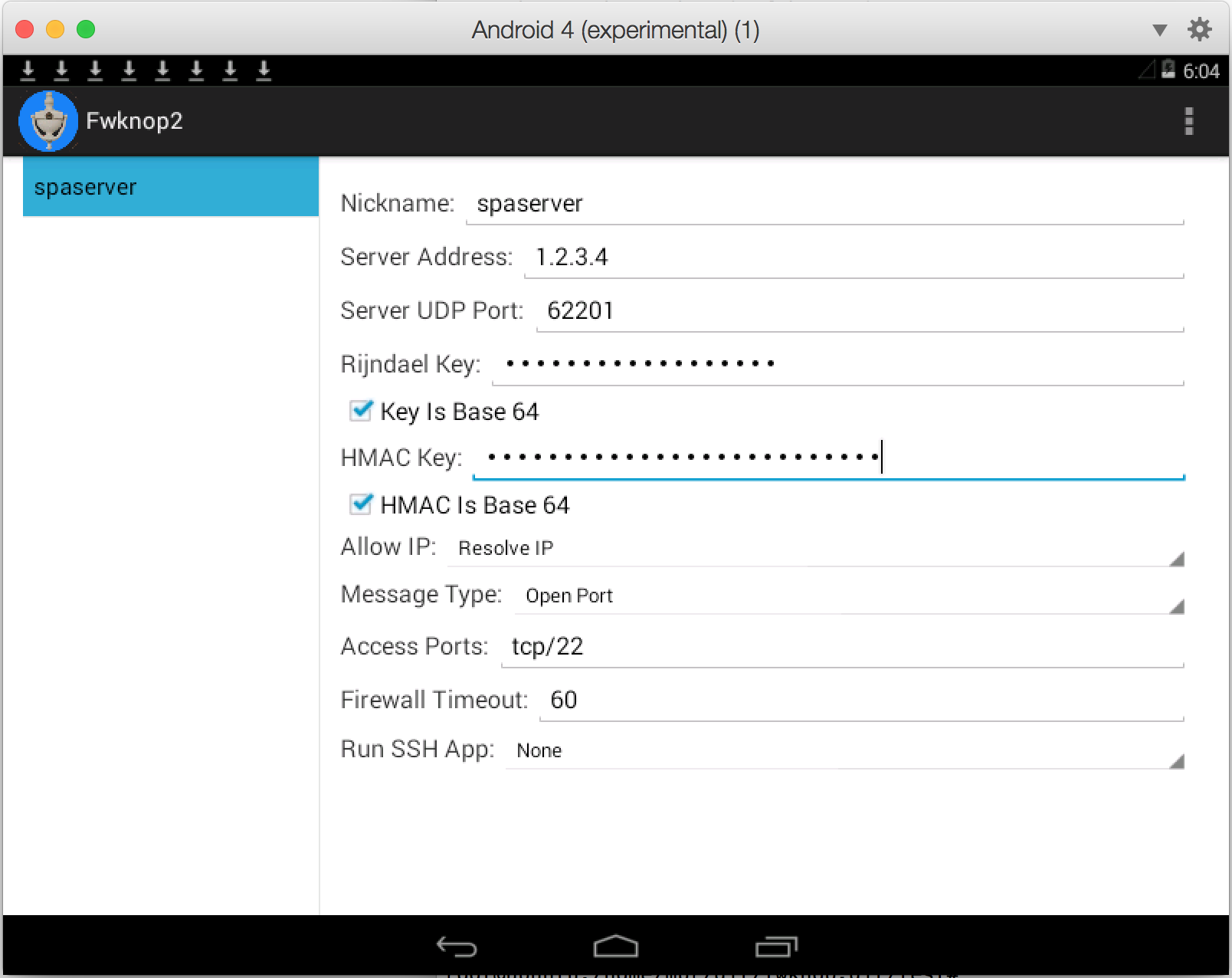
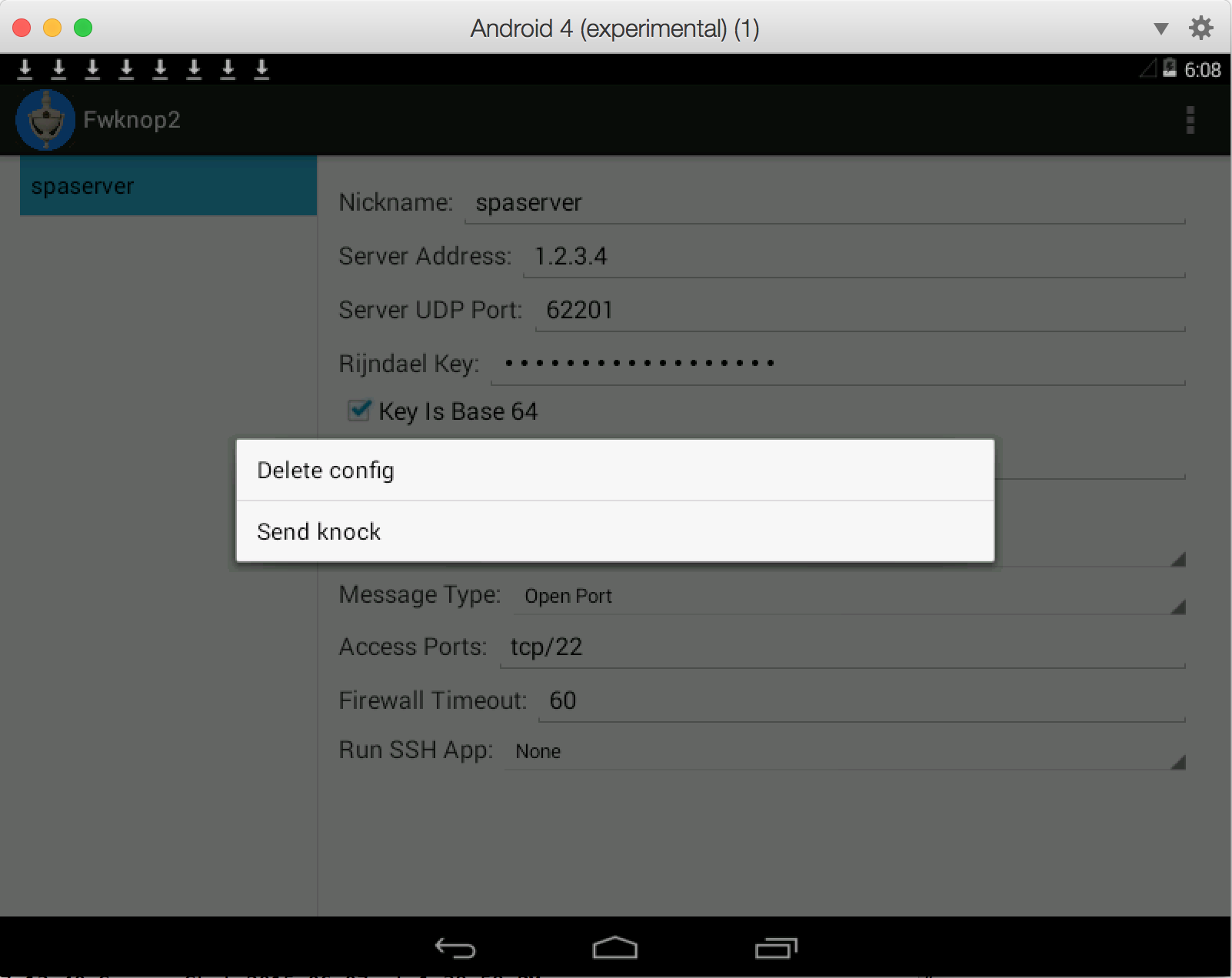
Below are screenshots of the fwknop client running on Android (under Parallels on a Mac). The code
itself is available here.
 4.9.3 Cross-Platform UI
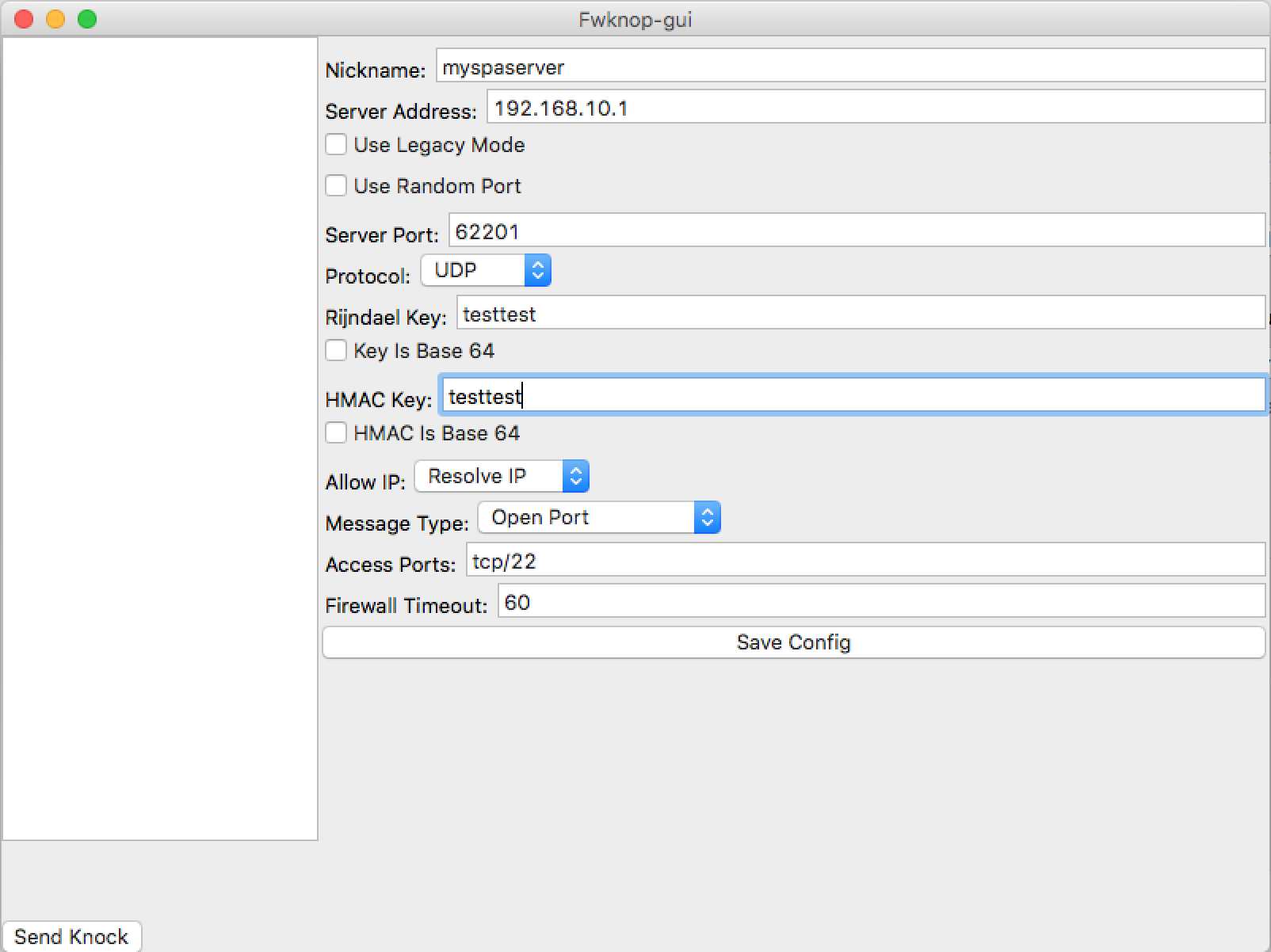
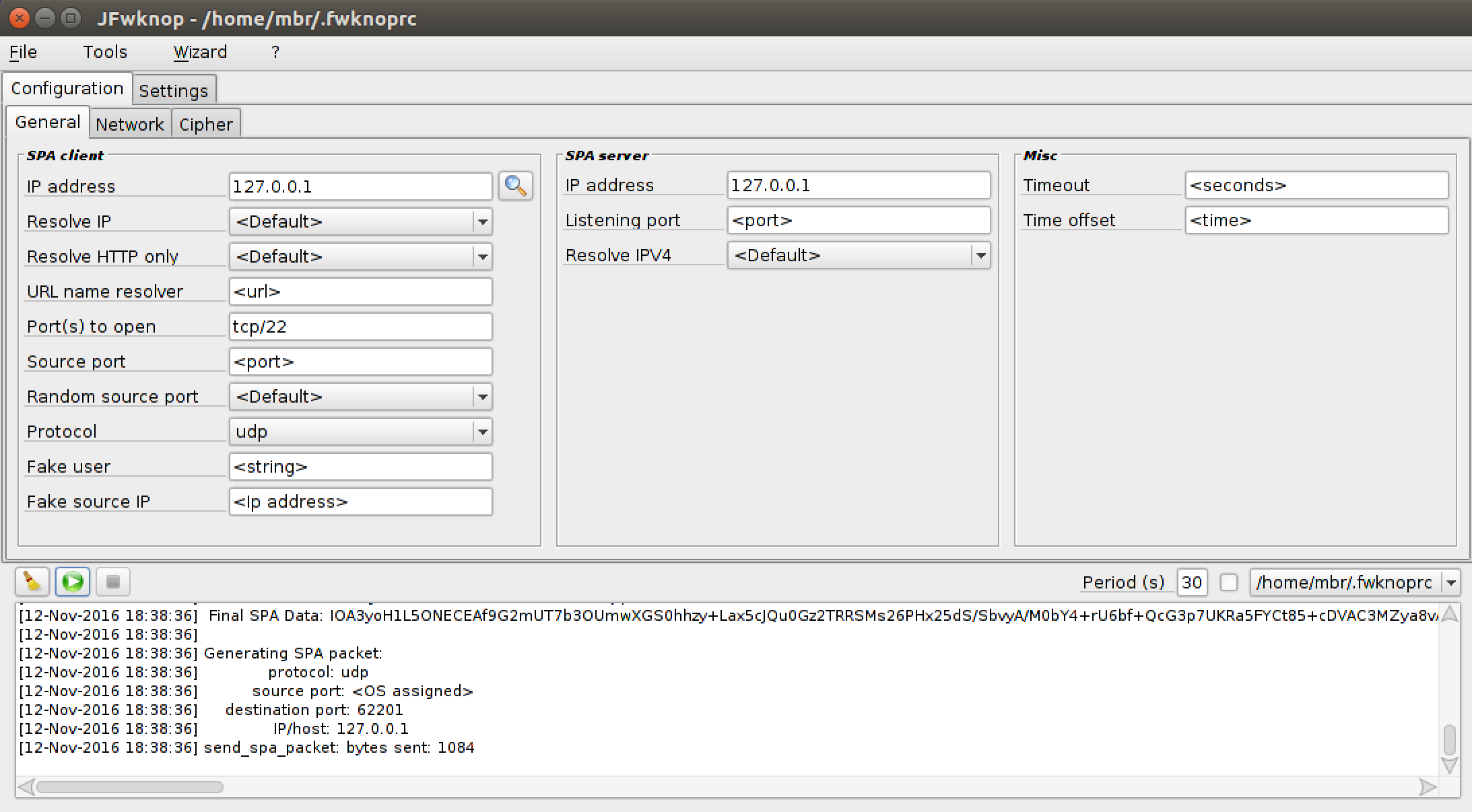
Jonathan Bennett develops and maintains a cross-platform
client UI for fwknop that runs on Windows, Linux,
and Mac OS X. This UI supports essential SPA features such as HMAC authenticated encryption, NAT modes,
port randomization, IP resolution, base64-encoded encryption and HMAC keys, saving configuration
stanzas, and more. Here is a screenshot of the UI running on a MAC:
4.9.3 Cross-Platform UI
Jonathan Bennett develops and maintains a cross-platform
client UI for fwknop that runs on Windows, Linux,
and Mac OS X. This UI supports essential SPA features such as HMAC authenticated encryption, NAT modes,
port randomization, IP resolution, base64-encoded encryption and HMAC keys, saving configuration
stanzas, and more. Here is a screenshot of the UI running on a MAC:
-Q <IP> -P udpraw" as follows:
[spaclient]$ fwknop -P udpraw -Q 4.4.4.4 -n spaserver.domain.com
4.4.4.4. However, with REQUIRE_SOURCE_ADDRESS enabled in the
/etc/fwknop/access.conf file, fwknopd will only allow access to the IP address
that is encrypted within the SPA packet - not the spoofed source address. In this case, since
the -a argument was used, the IP that will be allowed is 1.1.1.1 for
the spaclient system:
Jun 22 22:14:56 spaserver fwknopd[12624]: (stanza #1) SPA Packet from IP: 4.4.4.4 received with access source match
Jun 22 22:14:56 spaserver fwknopd[12624]: Added Rule to FWKNOP_INPUT for 1.1.1.1, tcp/22 expires at 1349403326
--verbose mode, and this prints out the raw encrypted SPA
payload data that fwknop transmits on the wire. From this output, here is the raw payload data:
8rqjaO4SdW4Yaf1grhi0f3pcdcWO6ZpRxnduxHwJ/5zcqne0VCrZ8oibPYiwazGCOJ7HhGy+f2ju2mVz//DnIr4qKYf48gqe0QJz14Y6Z7BQCYdJdwyYz+hTo9Z41tOA788VcK7sK2XJjdPQL0C794QqEFAqCOyno1VTsf4E2vlPP7Kum94SfyRJzAYwl86LVMQtt7H0/zP0
tcpdump to verify that this data is
what the client sends over the wire. Now, from the Quick Start section, this SPA packet was
already sent from the spaclient system to the spaserver system in order
to gain access to SSHD. So, this particular SPA packet has been used once, and therefore should
never be seen again on the wire. Let's assume that an attacker was able to monitor and capture
the SPA packet above, and that the same attacker thinks that this data might be part of SPA
communications. The attacker is certainly free to replay the same packet on the wire and send
it to the spaserver system, and this is easily done as follows:
[attacker]$ echo -n "8rqjaO4SdW4Yaf1grhi0f3pcdcWO6ZpRxnduxHwJ/5zcqne0VCrZ8oibPYiwazGCOJ7HhGy+f2ju2mVz//DnIr4qKYf48gqe0QJz14Y6Z7BQCYdJdwyYz+hTo9Z41tOA788VcK7sK2XJjdPQL0C794QqEFAqCOyno1VTsf4E2vlPP7Kum94SfyRJzAYwl86LVMQtt7H0/zP0" | nc -u spaserver.domain.com 62201
spaserver system, fwknopd will sniff the replayed SPA packet, and will
compare the SHA-256 digest of this packet vs. the SHA-256 digest of all previously seen and
properly decrypted SPA packets. If there is a match, then fwknopd knows that a replay attack
was attempted (subject to there not being a collision in the SHA-256 calculation, which is
exceedingly unlikely). In this case, fwknopd generates the following warning via
syslog, and no access is granted to the attacker:
Jun 22 11:52:31 spaserver fwknopd[12624]: Replay detected from source IP: 3.3.3.3, Destination proto/port: 17/62201, Original source IP: 1.1.1.1, Original dst proto/port: 17/62201, Entry created: 06/22/13 11:52:31
3.3.3.3.
This is the attacker's IP address that we've chosen for the purposes of illustration. It makes
no difference what the source IP is of the replayed packet because the SHA-256 digest is
computed over the SPA payload data.
4.12 SPA Over Tor
Adding strong anonymity to SPA communications via Tor
is possible if one agrees to send SPA packet data over established TCP connections. This is a
requirement because building a virtual circuit through the Tor network is only done for TCP,
and then only for connections that are in the established state. (This is why Nmap SYN scans
cannot be sent over Tor, but TCP connect() scans can.) The fwknop "-P tcp"
argument instructs the fwknop client to establish a TCP connection with the SPA packet destination,
so if this destination happens to be a proxy that can communicate over Tor then we're in business.
This is where the socat project comes in. We'll
use it to create a socks proxy that interfaces with Tor, and then connect to it with the fwknop
client. This requires that the fwknop daemon listen on a TCP port for SPA data, and for this we
set "ENABLE_TCP_SERVER Y;" in the /etc/fwknop/fwknopd.conf file on
spaserver. By default, in this mode fwknopd listens on TCP port 62201, but this can
be changed with the TCPSERV_PORT variable. Before restarting fwknopd, we'll create
a dedicated set of Rijndael and HMAC keys for SPA packets that are sent over Tor:
[spaclient]$ fwknop -n spa.tor -A tcp/22 -a 1.1.1.1 -D 127.0.0.1 -P tcp --key-gen --use-hmac --save-rc-stanza
[+] Wrote Rijndael and HMAC keys to rc file: /home/mbr/.fwknoprc
[spaclient]$ grep KEY /home/mbr/.fwknoprc
KEY_BASE64 7a+TXvZJAshezEG0vxpczs0js+e1DawDvBGd1JQDxjI=
HMAC_KEY_BASE64 YcFjQulemqbnR89z3V1AmnVrV0KYTO4n6lU2Pk5qUrUgMOXYaHSDqCHg3P8KKcr6lH8bHpbeDfax7nIpwOswQg==
--- We transfer the new keys to the spaserver.domain.com system, place
--- them in /etc/fwknop/access.conf in a new access stanza, and restart
--- fwknopd.
socat proxy on spaclient and run fwknop.
[spaclient]$ socat TCP-LISTEN:62201 SOCKS4A:127.0.0.1:2.2.2.2:62201,socksport=9050 &
[1] 20551
[spaclient]$ fwknop -n spa.tor
spaserver).
The fwknop daemon monitors the SPA packet, and grants access to sshd from 1.1.1.1:
Jun 22 23:11:56 spaserver fwknopd[12624]: (stanza #1) SPA Packet from IP: 96.47.N.N received with access source match
Jun 22 23:11:56 spaserver fwknopd[12624]: Added Rule to FWKNOP_INPUT for 1.1.1.1, tcp/22 expires at 1349403326
/etc/tor/torrc via the
"ExitNodes" directive. In this case, you would want to instruct fwknopd to allow
the ssh connection from the same exit router by specifying its IP on the fwknop command line
e.g. "-a 96.47.N.N".
[spaclient]$ fwknop -n spa.tor -a 96.47.N.N
These scenarios and many others are now supported with a new "command open/close cycle" feature in fwknop-2.6.8. Essentially, fwknopd has the ability to execute an arbitrary command upon receiving a valid SPA packet (the "open"), and then execute a different command after a configurable timeout (the "close"). This allows fwknopd to integrate with any third-party device or software if open and close commands can be defined for how to interact. These commands are specified on a per-stanza basis in the access.conf file, and a set of variable substitutions are supported such as '$SRC', '$PORT', '$PROTO', and '$CLIENT_TIMEOUT'. Naturally, the IP address, port, and protocol are authenticated and decrypted out a valid SPA packet - i.e., SPA packet headers are not trusted.
Let's see an example on a Linux system ("spaserver"). Here, we're going to have fwknopd interface with ipset instead of iptables. First, we'll create an ipset named fwknop_allow, and we'll link it into the local iptables policy. If a packet hits the fwknop_allow ipset and there is no matching source IP, then the DROP rule at the end of the iptables policy implements the default-drop policy. No userspace daemon such as SSHD can be scanned or otherwise attacked from remote IP addresses without first producing a valid SPA packet.
[spaserver]# ipset create fwknop_allow hash:ip,port timeout 30
[spaserver]# iptables -A INPUT -m conntrack --ctstate ESTABLISHED,RELATED -j ACCEPT
[spaserver]# iptables -A INPUT -m set --match-set fwknop_allow src,dst -j ACCEPT
[spaserver]# iptables -A INPUT -j DROP
Now, we create a stanza in the fwknop /etc/fwknop/access.conf file and fire up fwknopd like this:
[spaserver]# cat /etc/fwknop/access.conf
SOURCE            ANY
KEY_BASE64        <base64 string>
HMAC_KEY_BASE64   <base64 string>
CMD_CYCLE_OPEN    ipset add fwknop_allow $SRC,$PROTO:$PORT timeout $CLIENT_TIMEOUT
CMD_CYCLE_CLOSE   NONE

[spaserver]# service fwknopd start
With fwknopd running and iptables configured to drop everything except for IP communications that match the fwknop_allow ipset, let's use the fwknop client from a remote system "spaclient" to gain access to SSHD on the server for 30 seconds (note that the iptables conntrack module will keep the connection open after the SPA client IP is removed from the ipset). We'll assume that the encryption and HMAC keys have been previous shared between the two systems, and on the client these keys have been written to the "spaserver" stanza in the ~/.fwknoprc file:
[spaclient]$ fwknop -A tcp/22 -a 1.1.1.1 -f 30 -n spaserver
[spaclient]$ ssh user@spaserver
[spaserver]$
So, behind the scenes after the SPA packet has been sent above, fwknopd on the server has authenticated and decrypted the SPA packet, and has executed the following ipset command. In this case, there is no need for a corresponding close command because ipset implements the timer provided by the client itself, so the client IP is deleted from the ipset automatically. (In other scenarios, the close command can be fully specified instead of using the string 'NONE' as we have above.) Here are the syslog messages that fwknopd has generated, along with the 'ipset list' command output to show the 1.1.1.1 IP as a member of the set:
[spaserver]# grep fwknopd /var/log/syslog |tail -n 2
Dec 23 15:38:06 ubuntu fwknopd[13537]: (stanza #1) SPA Packet from IP: 1.2.3.4 received with access source match
Dec 23 15:38:06 ubuntu fwknopd[13537]: [1.2.3.4] (stanza #1) Running CMD_CYCLE_OPEN command: /sbin/ipset add fwknop_allow 1.1.1.1,6:22 timeout 30

[spaserver]# ipset list
Name: fwknop_allow
Type: hash:ip,port
Revision: 5
Header: family inet hashsize 1024 maxelem 65536 timeout 30
Size in memory: 224
References: 0
Members:
1.1.1.1,tcp:22 timeout 27
In addition to the ability to swap out the existing firewall with a completely different filtering infrastructure, there are other notable features and fixes in the 2.6.8 release. The most important of these is a new feature implemented by Jonathan Bennett (and suggested by Hank Leininger in github issue #62) that allows access.conf files to be imported via a new '%include' directive. This can be advantageous in some scenarios by letting non-privledged users define their own encryption and authentication keys for SPA operations. This way, users do not need write permissions to the main /etc/fwknop/access.conf file to change keys around or define new ones. 4.14 Backwards Compatibility With the 2.5 release, fwknop underwent significant changes in its usage of cryptography including the addition of support for HMAC authenticated encryption for both Rijndael and GnuPG modes, ensuring the proper usage of PBKDF1 for key derivation when SPA packets are encrypted with Rijndael, and several bugs were fixed from previous versions of fwknop. In general, this implies that when Rijndael is used, SPA packets produced by the 2.5 release are incompatible with previous versions of fwknop. The GnuPG encryption mode is unaffected by these updates. However, even when Rijndael is used, backwards compatibility is supported through setting the legacy encryption mode with
-M on the fwknop client command line and/or the ENCRYPTION_MODE variable in the
/etc/fwknop/access.conf file. This way, a pre-2.5 server can decrypt SPA packets produced
by a 2.5 and later client (set -M legacy), and a 2.5 and later server can decrypt SPA
packets produced by pre-2.5 clients (set ENCRYPTION_MODE legacy in the access.conf file).
Note that HMAC is only supported as of 2.5 and is an optional feature, so backwards
compatibility support is only possible for configurations that don’t use an HMAC on either
side. It is strongly recommended to upgrade all fwknop clients and servers to 2.5 and use
the new HMAC mode for properly authenticated SPA communications. The backwards compatibility
support is used to make it easier to upgrade clients and servers with a phased approach.
For emphasis, if the fwknopd server is upgraded to 2.5 (or later), and if older clients cannot be upgraded at the same time for some reason, then for each
SOURCE
stanza in the /etc/fwknop/access.conf file, add the following line:
ENCRYPTION_MODE legacy
-M legacy
argument to the fwknop command line:
[spaclient]$ fwknop -A tcp/22 -M legacy -a 1.1.1.1 -D spaserver.domain.com
Enter encryption password:
- No Heavyweight Interpreted Languages Many people don't want to install perl, python, or ruby on a firewall or network gateway device. Such languages are large and complex, and are implemented by similarly complex binaries that are usually themselves written in a language like C. Firewalls are frequently stripped down systems that are designed to just filter network traffic, provide administrative interfaces and sometimes VPN services, and not do much else. Both the fwknop client and server are entirely written in C - there is no requirement for perl, python, or any other interpreted language.
- Support Embedded Devices A consequence of fwknop being developed in C is that it only uses minimal system resources and can therefore support embedded devices that don't have a lot of computing power or main memory. For example, where the older perl version of fwknop could not run on Linksys routers supported by OpenWRT, these same routers can run the newer C version of fwknop.
- Don't Require Admin Access to Run the SPA Client There are many computing environments where users don't have privileged accounts. This should not present a barrier to using the SPA client. In fwknop, SPA packets are (by default) sent over a regular UDP socket and therefore require no special privileges.
- Don't Require the Manipulation of Raw Packet Headers
There are some SPA implementations that communicate information within specially modified
fields within IP or TCP headers. Such manipulation requires that the user have the
ability to acquire a raw socket from the OS, and this requires admin level privileges.
In addition, RFC 6864 permits middleboxes to
permute/rewrite IP header fields,
so the communications of SPA software that relies on the IP ID field may not be compatible with
such devices. In effect, NAT operations might make an SPA packet from the client unrecognizable
to the intended legitimate target.
Further, depending on how the SPA client manipulates packet headers when building an SPA packet, other monitoring systems such as an IDS or a passive OS fingerprinter may produce event data that unnecessarily calls attention to the SPA communications. This is not to say that it is impossible to detect SPA packets generated by fwknop - it is just that a monitoring system is more likely to flag communications that involve manipulated packet headers than to generate an event for packets produced by fwknop. For example, intrusion detection systems track TCP connections, and spoofed TCP ACK's that are not part of a proper connection (assuming non-asymmetric routing) may potentially be flagged. Also, manipulated TCP options fields that don't conform to OS defaults will cause an OS to appear to change under the observation of things like p0f. While sometimes this is an expected behavior such as if a VM is being run or a system is actually a NAT device with other systems behind it, there are plenty of deployment scenarios where this is not expected. - Don't trust the IP header
Any SPA implementation that trusts the source IP address in the IP header of the SPA packet
is vulnerable to a MITM attack. An inline device that can intercept an SPA packet
can hold the original packet and retransmit it but with the source IP changed to
whatever the attacker wants. If the SPA server relies on the source IP in the
IP header, then it has no way to know that it isn't legitimate. If an SPA
implementation is going to go to the trouble of leveraging cryptography - certainly
important since replay attacks among other problems can't be prevented without it - then
the IP should be made part of an encrypted payload. This is exactly what fwknop does with
the
-aor-Rarguments on the fwknop command line. An attacker can intercept an SPA packet produced by fwknop, change the source IP and retransmit, but SPA server will only allow access to the IP that was originally encrypted within the SPA payload. - Support Server-Side NAT There are plenty of networks with a border firewall where a remote user actually wants access to a service that is running on an internal system and not on the firewall itself. Typical ways of accessing such a service involve running VPN software, but with an SPA implementation that can manipulate NAT rules on the border firewall it is possible to transparently grant SPA users access to internal services through the firewall. With fwknop, the capability to leverage server-side NAT has been built in for a long time.
- Support Cloud Computing Environments Supporting Cloud Computing environments such as Amazon's AWS Virtual Private Cloud (VPC) networks is an extension of supporting server-side NAT. Since
- Support Multiple Firewalls Because fwknop does not rely on specialized logging infrastructure or link against libraries that are tied to one firewall architecture or another, it can easily support multiple firewalls just by executing the local firewall admin command line interface. It currently supports iptables and firewalld on Linux, ipfw on FreeBSD and Mac OS X, and pf on OpenBSD.
- Minimize Library Dependencies
Given the design decisions made by fwknop above, it is important to minimize library
dependencies and to audit the source code. Here are all library dependencies in the
fwknopd daemon including GnuPG support (this is optional) when installed on an Ubuntu
12.04 system:
The libfko library is developed by the fwknop project for SPA encryption, decryption, and validation. libpcap is a standard C library that is leveraged by a lot of security projects including intrusion detection systems and more. The gpgme libraries are only used if you want GnuPG support, and the remaining libraries are standard system libraries that typical Linux binaries need. That's it. One may certainly question the use of libpcap, and in defense of this choice note that: 1) fwknopd by default does not put the sniffing interface into promiscuous mode, 2) fwknopd by default only pays attention to UDP packets to port 62201, 3) if you examine Metasploit you'll see that there only a few exploits for pcap-based software and they target what rides on top of libpcap vs. libpcap itself, and 4) even if there is a vulnerability in libpcap, the exploit model is different than it is for normal server software that you can easily scan for, and being different in this game is good.$ ldd /usr/sbin/fwknopdlinux-vdso.so.1 => (0x00007ffeebf820e0)libfko.so.0 => /usr/lib/libfko.so.0 (0x00007f1a6ae930e0)libpcap.so.0.8 => /usr/lib/x86_64-linux-gnu/libpcap.so.0.8 (0x00007e1a6a85c0e0)libc.so.6 => /lib/x86_64-linux-gnu/libc.so.6 (0x00007e1a6a49e0a0)libgpgme.so.11 => /usr/lib/libgpgme.so.11 (0x00007f1aeaee800e)/lib64/ld-linux-x86-64.so.2 (0x00007e1a6aede0e0)libgpg-error.so.0 => /lib/x86_64-linux-gnu/libgpg-error.so.0 (0x0000ef1a6a06e0e0)
If fwknop is compiled with the--enable-udp-serverand--without-gpgmearguments to theconfigurescript, then even fewer libraries are required. In this case, not even libpcap is a dependency:$ ldd /usr/sbin/fwknopdlinux-vdso.so.1 => (0x00007ffeebf820e0)libfko.so.2 => /usr/lib/libfko.so.2 (0x00007f1a6ae930e0)libc.so.6 => /lib/x86_64-linux-gnu/libc.so.6 (0x00007e1a6a49e0a0)/lib64/ld-linux-x86-64.so.2 (0x00007e1a6aede0e0) - Support Both Symmetric and Asymmetric Ciphers Some users prefer the security properties that asymmetric crypto systems have over those provided by symmetric algorithms like Rijndael, or vice versa. fwknop supports both Rijndael and GnuPG for SPA encryption/decryption. Because GnuPG requires the libgpgme library, the default is to use Rijndael but GnuPG can be used if libgpgme is installed and appropriate keys are set up. For Rijndael, fwknop uses the open source C implementation developed for the Crypt::CBC CPAN module, and the encryption/decryption operations it provides are verified by the test suite as compatible with OpenSSL. Why not just use OpenSSL directly? Because OpenSSL does a lot more things (each with associated potential for vulnerabilities) than provide just the Rijndael and digest capabilities that are needed by fwknop. Also, by automatically verifying OpenSSL compatibility, fwknop is able to leverage changes and bug fixes in OpenSSL as a way to improve too. For those that still want fwknop to use OpenSSL instead of the Crypt::CBC implementation, this will be offered in a future version as a compile time option.
- Support HMAC for Authenticated Encryption Authenticated encryption with an HMAC is supported by fwknop for both symmetric and asymmetric encryption modes. The implementation is careful to apply an HMAC to SPA packets according to the encrypt-then-authenticate model which provides strong resistance to certain kinds of cryptanalytic attacks. In addition, on the fwknopd server side, verification of the HMAC is a more simplistic operation than sending data through a set of decryption routines, so this provides an additional security benefit by reducing the complexity of code the malicious traffic can interact with. This is particularly true for SPA packets that are encrypted with GnuPG.
- Leverage Compiler and OS Security Features
By default, fwknop is:
- Compiled with
-Wallto flag all compile warnings (zero warnings currently on Ubuntu 12.04 withgcc-4.6.3). - Built with
-fstack-protectorfor gcc protection against stack overflows. The upcoming-fstack-protector-strongflag in gcc-4.9 will be used as well when it is available. - Built with support for Address Space Layout Randomization (ASLR) / built as Position Independent Executable (PIE).
- Built with Fortify Source (
-D_FORTIFY_SOURCE=2). - Built with RELRO.
- Built with BIND_NOW.
Many of the security hardening features above are described in the Ubuntu Security Wiki.
In addition, there is an AppArmor policy available for the fwknop daemon in order to provide kernel-level Mandatory Access Control (MAC) constraints to what fwknopd can do. Further, the Google Address Sanitizer (ASan) extension to gcc and clang is regularly used for fwknop test suite execution cycles. - Compiled with
- Apply Both Static and Dynamic Analysis Tools Maintaining the security of the fwknop implementation is of the utmost importance to the fwknop project, and therefore the usage of both static and dynamic analysis tools is built into to the fwknop develop process. For static analysis, fwknop uses the excellent Coverity Scan tool that Coverity makes available for free to open source projects. If you are a maintainer of an open source project written in C/C++ you should be using Coverity. Many bugs were found with Coverity that would have been difficult to find using other techniques, and as of the 2.5 release fwknop has a Coverity defect score of zero. Additional static analysis tools are used such as the CLANG static analyzer and splint. For dynamic analysis, fwknop uses valgrind for memory leak detection and other potential problems.
- Leverage Fuzzing Tools Fuzzing is an additional technique that is leveraged for verifying the security of fwknop. There are two tools of choice to fuzz fwknop: the excellent American Fuzzy Lop (AFL) fuzzer written by Michal Zalewski, and a custom fuzzer that was developed specfically for the fwknop project. During the development process and for each fwknop release, comprehensive fuzzing runs are performed against the code base to try and uncover any programming bugs. Here is an example of a fuzzing cycle against the fwknopd server (version 2.6.5) with AFL that took six days with a total of 1.5 billion executions - no crashes or hangs were discovered:
fwknopd
can build NAT rules for incoming connections to other internal systems transparently,
this easily brings SPA to cloud computing networks. For instance, an important
use case for SPA within Amazon's cloud is the ability to protect internal Windows
instances from the Windows RDP vulnerability from 2012
(CVE-2012-0002).
One challenge for this is the fact that fwknopd does not directly support a Windows
firewall. The solution is to deploy a virtual Linux instance on the VPC network and
then use either the normal SNAT/DNAT capabilities in fwknopd, or use FORCE_NAT
mode. Either way, RDP connections can be made to internal Windows systems through the
Linux "jump host" after a proper SPA packet is sent. With fwknopd deployed in this way,
the Linux system is essentially turned into an internal gateway inside the VPC network
that is independent (and in addition to) normal border controls that Amazon itself
maintains. This scenario is illustrated by the following graphic, and was the topic
of a ShmooCon 2013 talk
(slides,
video):
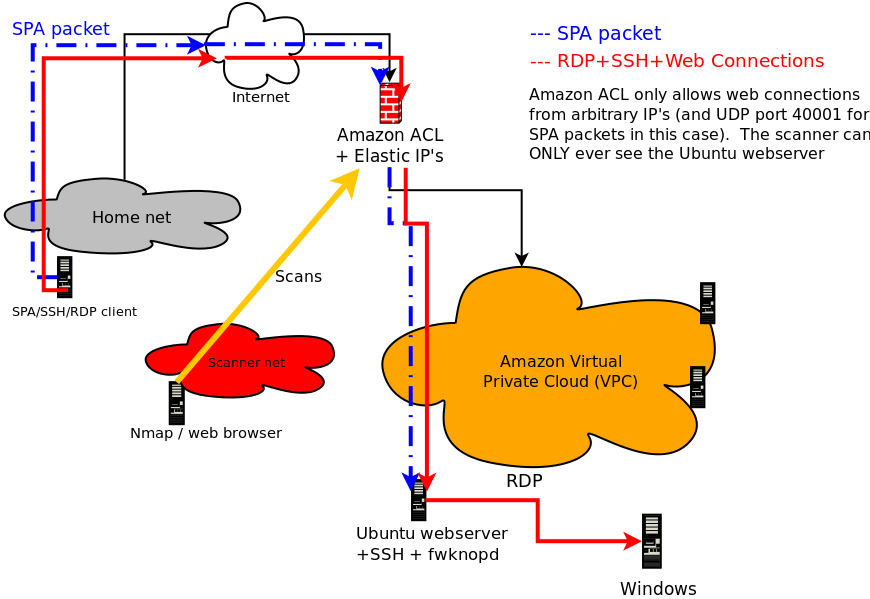
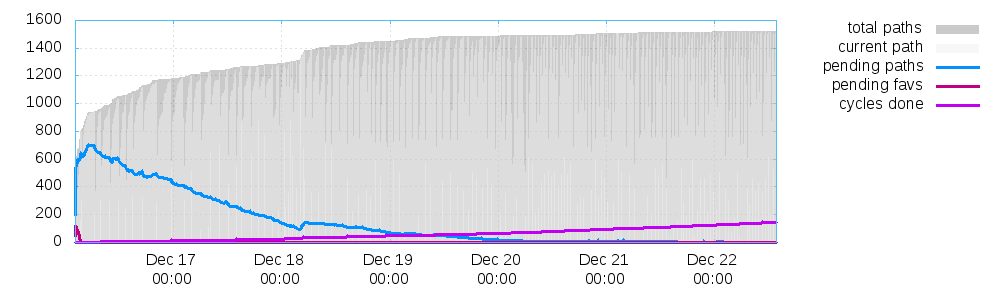
libfko library to generate SPA
packets) creates SPA data according to a particular format before it is encrypted. This
allows the fwknopd daemon to validate incoming SPA packets and apply appropriate access controls.
Every SPA packet has a series of mandatory fields, and depending on the desired access may
also contain a series of optional fields. The fwknop client accepts input from the user,
populates the SPA packet with data built from this input, encrypts, base64 encodes, and applies
an HMAC to the packet, and then sends in out on the wire towards the SPA server.
Mandatory SPA Packet Fields:
- 16 bytes of random data
- Local username
- Local time stamp
- fwknop version
- SPA message type
- Access request or command to execute
- SPA message digest (SHA-256 by default)
- NAT access request
- Third-party authentication information
- Firewall rule timeout
[spaclient]$ fwknop -A tcp/22 -a 1.1.1.1 -D spaserver --verbose
Enter encryption password:
19:58:12.593286 IP 1.1.1.1.33299 > 2.2.2.2.62201: UDP, length 204
0x0000: 4500 00bd bad1 4000 4011 815c 7f00 0001 E.....@.@..\....
0x0010: 7f00 0001 8213 f2f9 00a9 febc 612f 755a ............a/uZ
0x0020: 7054 3543 5a67 5043 684b 625a 6634 4f6d pT5CZgPChKbZf4Om
0x0030: 4b57 3150 5371 7939 4543 3777 4c70 4831 KW1PSqy9EC7wLpH1
0x0040: 5432 3432 5234 6b70 4d30 4772 4877 7862 T242R4kpM0GrHwxb
0x0050: 6a37 314b 2b66 7656 3162 6432 776f 6c39 j71K+fvV1bd2wol9
0x0060: 4679 756c 3849 326b 4d68 654e 4859 614d Fyul8I2kMheNHYaM
0x0070: 4266 3244 6e35 436f 6f64 7a53 2b55 3173 Bf2Dn5CoodzS+U1s
0x0080: 3959 3733 4f65 7545 756d 3761 6335 4873 9Y73OeuEum7ac5Hs
0x0090: 7766 4854 7078 6a36 344b 3556 5973 544c wfHTpxj64K5VYsTL
0x00a0: 7575 2f6e 486b 566d 7947 4448 7678 2b6c uu/nHkVmyGDHvx+l
0x00b0: 7333 7664 3445 6261 517a 4569 62 s3vd4EbaQzEib
a/uZpT5CZgPChKbZf4OmKW1PSqy9EC7wLpH1T242R4kpM0GrHwxbj71K+fvV1bd2wol9Fyul8I2kMheNHYaM \
Bf2Dn5CoodzS+U1s9Y73OeuEum7ac5HswfHTpxj64K5VYsTLuu/nHkVmyGDHvx+ls3vd4EbaQzEib
Also supported by fwknop is GnuPG for asymmetric encryption, and SPA packets encrypted with GnuPG are typically much larger - on the order of about 1000 bytes. Similarly to the above output, here is an example of using fwknop to build an SPA packet with GnuPG (command output has again been removed):
[spaclient]$ fwknop --gpg-recip 361BBAD4 --gpg-sign 6A3FAD56 -A tcp/22 -a 1.1.1.1 -D spaserver --verbose
Enter passphrase for signing:
20:10:58.674052 IP 1.1.1.1.44954 > 2.2.2.2.62201: UDP, length 1044
0x0000: 4500 0430 a6f2 4000 4011 91c8 7f00 0001 E..0..@.@.......
0x0010: 7f00 0001 af9a f2f9 041c 0230 494f 4133 ...........0IOA3
0x0020: 796f 4831 4c35 4f4e 4543 4541 662f 554e yoH1L5ONECEAf/UN
0x0030: 506b 5a61 6374 4259 4e53 5955 5964 6c30 PkZactBYNSYUYdl0
0x0040: 5944 5a46 662f 3234 5764 4468 6344 6d63 YDZFf/24WdDhcDmc
0x0050: 4a4e 4270 6f77 712f 7451 4978 5963 3253 JNBpowq/tQIxYc2S
0x0060: 7863 4758 4662 4362 304c 6c77 7476 654d xcGXFbCb0LlwtveM
0x0070: 6630 6472 6166 6476 4144 7361 4838 6b5a f0drafdvADsaH8kZ
0x0080: 7854 674f 4932 4877 4555 3756 7478 3766 xTgOI2HwEU7Vtx7f
0x0090: 6d55 3371 4f44 7938 4c6f 6978 786a 4d44 mU3qODy8LoixxjMD
0x00a0: 4251 3656 3145 5a4c 5331 6757 6550 5a70 BQ6V1EZLS1gWePZp
0x00b0: 4b6d 6b37 5358 5a61 6b74 7469 3958 594c Kmk7SXZaktti9XYL
0x00c0: 4246 4173 5470 4e4b 7175 2b53 4667 6774 BFAsTpNKqu+SFggt
0x00d0: 6846 4a33 724b 3064 657a 634d 6358 5739 hFJ3rK0dezcMcXW9
0x00e0: 6e48 5572 5057 6959 6745 6969 5773 6763 nHUrPWiYgEiiWsgc
0x00f0: 4841 4943 4f34 4178 5058 7767 5374 6162 HAICO4AxPXwgStab
...
0x0370: 632f 3658 694e 5836 4f57 5a31 4b7a 5263 c/6XiNX6OWZ1KzRc
0x0380: 6e4a 4852 5064 6f4d 6e42 2f6c 7367 4267 nJHRPdoMnB/lsgBg
0x0390: 4456 3952 5532 3463 6f53 7473 6732 7950 DV9RU24coStsg2yP
0x03a0: 346f 4a69 5830 664f 4e63 3430 304b 3175 4oJiX0fONc400K1u
0x03b0: 6c69 7641 6830 2f33 4b5a 7074 754d 5045 livAh0/3KZptuMPE
0x03c0: 6870 2b4a 7636 4745 6f43 796f 7978 372b hp+Jv6GEoCyoyx7+
0x03d0: 4e58 7264 4771 4b4c 7757 704b 6369 4167 NXrdGqKLwWpKciAg
0x03e0: 4974 7975 3854 3244 6255 616c 544c 782b Ityu8T2DbUalTLx+
0x03f0: 4d73 7168 4d69 4646 7575 3959 744a 2f2f MsqhMiFFuu9YtJ//
0x0400: 6661 7974 6d77 6d59 5533 6f48 6166 3547 faytmwmYU3oHaf5G
0x0410: 4330 434c 3044 5861 384a 4c52 572f 746e C0CL0DXa8JLRW/tn
0x0420: 2f71 6169 7977 4739 7374 664a 6976 4551 /qaiywG9stfJivEQ
IOA3yoH1L5ONECEAf/UNPkZactBYNSYUYdl0YDZFf/24WdDhcDmcJNBpowq/tQIxYc2SxcGXFbCb0LlwtveMf0drafdvADsaH8kZxTgOI2 \
HwEU7Vtx7fmU3qODy8LoixxjMDBQ6V1EZLS1gWePZpKmk7SXZaktti9XYLBFAsTpNKqu+SFggthFJ3rK0dezcMcXW9nHUrPWiYgEiiWsgcHAICO4AxPXwgS \
tabnqVrxT6QtVjX9uet2uG8JLkaTNzpmclFA6vyuK2XZAL7975YiOC6wMKaIqtrSjrKIUcfkUru9jDfHODP3GPf8h6t/4qDOFUzSfTVZ5EzegQEyV3MI3Qf \
EUAhdkBKySTamr/Af+M+CyJhJPbbqwy/LYjJM8ypkf75rV1gjGpLH1lgM+X/O6ARloRYYoTNuJyBhKHlJTB25QaXYfOvfBiRjLU7rqEDPC+coUdcrqZbl+i \
/HQMtVVqcrVJrzr6xVuI4ednShmwP3221pt2TgQ6HkP/8j2yMlNyEEYgjXKt+Zdlw3k0ODkFEH7cMIliUSgsOPzGtwO/WvDaVrkZQrZaZjS+lqGwvTn9dkL \
mcEV5iYuDTplmNOUSOX+afWaEH5S3t2P6ttsXhCD4Rzpx1uMDybwvss7ZIvYp91OPi957Pe1rCH3uCAeTzI5qbcR1PIu9X+dRDXpssaehmJLeq+DudZGQq3 \
e2NLAPAFpDH7MAc6AnXWfH2H2/sbXCSVqHPdsRH5yOlCxkW9ZGVnIdYPb9y3005Iz1trAJffLFVNCvLDQAcNA3qmUQHwHn6y2Vt30PiylPeOa6xrLlTmNs+ \
Q0jWOQdGR9q9NwN9I0U1GjIsWKNQJmi7c/6XiNX6OWZ1KzRcnJHRPdoMnB/lsgBgDV9RU24coStsg2yP4oJiX0fONc400K1ulivAh0/3KZptuMPEhp+Jv6G \
EoCyoyx7+NXrdGqKLwWpKciAgItyu8T2DbUalTLx+MsqhMiFFuu9YtJ//faytmwmYU3oHaf5GC0CL0DXa8JLRW/tn/qaiywG9stfJivEQ
- Use the -a option instead of
-Rto manually specify the IP to allow through the remote firewall. The-Roption is provided as a convenience only, and causes fwknop to issue both a DNS request and an HTTP request associated with cipherdyne.org, and these are trivially detectable to anyone who can sniff traffic from the fwknop client. - In Rijndael encryption mode, fwknop strips out the base64 encoded version of
the string "
Salted__" (used by the Rijndael implementation) before SPA packet transmission. So, the traffic analyst cannot simply write a Snort rule to look for the string "U2FsdGVkX1" at the beginning of a UDP packet to port 62201. - Change the port that fwknop uses to something other than that default. See
the
--server-portoption, and change thePCAP_FILTERvariable in the/etc/fwknop/fwknopd.conffile to something that will accept whatever port you have selected. - The fwknop client strips off any trailing "
=" characters before sending an SPA packet. These characters are an artifact of base64 encoding whenever the encoded length is not a multiple of four.
$ git clone https://www.github.com/mrash/fwknop fwknop.git
Cloning into 'fwknop.git'...
remote: Counting objects: 5275, done.
remote: Compressing objects: 100% (1603/1603), done.
remote: Total 5275 (delta 3672), reused 5155 (delta 3552)
Receiving objects: 100% (5275/5275), 2.07 MiB | 3.96 MiB/s, done.
Resolving deltas: 100% (3672/3672), done.
- "An Analysis of Port Knocking and Single Packet Authorization" - this is a Master's Thesis completed in September, 2006 by Sebastien Jeanquier at the Royal Holloway College, University of London about the concepts of port knocking and Single Packet Authorization. This is a standard reference for issues surrounding PK/SPA, and makes an excellent argument for why neither PK nor SPA suffer from the "security through obscurity" problem.
- Online fwknop man pages - the complete man pages for fwknop. This is the most comprehensive documentation for the command line arguments supported by the fwknopd daemon and the fwknop client.
- Wikipedia on Port Knocking and SPA - this is the latest information that Wikipedia has on PK/SPA, and provides a fairly good introduction to the technology and tradeoffs.
- "Single Packet Authorization with fwknop" - this paper was published in the February, 2006 issue of USENIX ;login: Magazine, and is the first article on the fwknop implementation of SPA.
- " Enhancing Firewalls: Conveying User and Application Identification to Network Firewalls" - this is a Master's Thesis completed in May, 2007 by Rennie deGraaf at the the University of Calgary.
- " Linux Firewalls: Attack Detection and Response with iptables, psad, and fwsnort" - Chapters 12 and 13 of this book published by No Starch Press in October 2007 discuss port knocking and Single Packet Authorization.
- " Generalized Single Packet Authorization for Cloud Computing Environments" - slides for a talk given at the ShmooCon conference in Washington D.C. in 2013.
- " Recent Advances in Single Packet Authorization" - this is the set of slides for a talk given at the HOPE Number Nine conference in New York City in July 2012.
- " Port Knocking and Single Packet Authorization: Practical Deployments" - this is the set of slides for a talk given at The Last HOPE conference in New York City in July 2008.
- " Zero-day Attack Prevention via Single Packet Authorization" - slides from the Techno Security conference in Myrtle Beach in June 2007.
- " Service Cloaking and Anonymous Access; Combining Tor with Single Packet Authorization (SPA)" - slides from the Defcon conference in Las Vegas in August 2006.
[spaclient]$ fwknop --help
fwknop client version 2.6.8
Single Packet Authorization client - http://www.cipherdyne.org/fwknop/

Usage: fwknop -A <port list> [-s|-R|-a] -D <spa_server> [options]

 -n, --named-config          Specify a named configuration stanza in the
                             '$HOME/.fwknoprc' file to provide some of all
                             of the configuration parameters.
                             If more arguments are set through the command
                             line, the configuration is updated accordingly
 -A, --access                Provide a list of ports/protocols to open
                             on the server (e.g. 'tcp/22').
 -a, --allow-ip              Specify IP address to allow within the SPA
                             packet (e.g. '123.2.3.4'). If
 -D, --destination           Specify the hostname or IP address of the
                             fwknop server.
 -h, --help                  Print this usage message and exit.
 -B, --save-packet           Save the generated packet data to the
                             specified file.
 -b, --save-packet-append    Append the generated packet data to the
                             file specified with the -B option.
 -C, --server-cmd            Specify a command that the fwknop server will
                             execute on behalf of the fwknop client..
 -N, --nat-access            Gain NAT access to an internal service.
 -p, --server-port           Set the destination port for outgoing SPA
                             packet.
 -P, --server-proto          Set the protocol (udp, tcp, http, tcpraw,
                             icmp) for the outgoing SPA packet.
                             Note: The 'tcpraw' and 'icmp' modes use raw
                             sockets and thus require root access to use.
 -s, --source-ip             Tell the fwknopd server to accept whatever
                             source IP the SPA packet has as the IP that
                             needs access (not recommended, and the
                             fwknopd server can ignore such requests).
 -S, --source-port           Set the source port for outgoing SPA packet.
 -Q, --spoof-source          Set the source IP for outgoing SPA packet.
 -R, --resolve-ip-http       Resolve the external network IP by
                             connecting to a URL such as the default of:
                             http://www.cipherdyne.org/cgi-bin/myip
                             This can be overridden with the --resolve-url
                             option.
     --resolve-url           Override the default URL used for resolving
                             the source IP address.
 -u, --user-agent            Set the HTTP User-Agent for resolving the
                             external IP via -R, or for sending SPA
                             packets over HTTP.
 -H, --http-proxy            Specify an HTTP proxy host through which the
                             SPA packet will be sent. The port can also be
                             specified here by following the host/ip with
                             ":<port>".
 -U, --spoof-user            Set the username within outgoing SPA packet.
 -l, --last-cmd              Run the fwknop client with the same command
                             line args as the last time it was executed
                             (args are read from the ~/.fwknop.run file).
 -G, --get-key               Load an encryption key/password from a file.
     --stdin                 Read the encryption key/password from stdin
     --fd                    Specify the file descriptor to read the
                             encryption key/password from.
 -k, --key-gen               Generate SPA Rijndael + HMAC keys.
 -K, --key-gen-file          Write generated Rijndael + HMAC keys to a
                             file
     --key-rijndael          Specify the Rijndael key. Since the password is
                             visible to utilities (like 'ps' under Unix) this
                             form should only be used where security is not
                             important.
     --key-base64-rijndael   Specify the base64 encoded Rijndael key. Since
                             the password is visible to utilities (like 'ps'
                             under Unix) this form should only be used where
                             security is not important.
     --key-base64-hmac       Specify the base64 encoded HMAC key. Since the
                             password is visible to utilities (like 'ps'
                             under Unix) this form should only be used where
                             security is not important.
 -r, --rand-port             Send the SPA packet over a randomly assigned
                             port (requires a broader pcap filter on the
                             server side than the default of udp 62201).
 -T, --test                  Build the SPA packet but do not send it over
                             the network.
 -v, --verbose               Set verbose mode (may specify multiple times).
 -V, --version               Print version number.
 -m, --digest-type           Specify the message digest algorithm to use.
                             (md5, sha1, sha256, sha384, or sha512). The
                             default is sha256.
 -M, --encryption-mode       Specify the encryption mode when AES is used
                             for encrypting SPA packets.The default is CBC
                             mode, but others can be chosen such as CFB or
                             OFB as long as this is also specified in the
                             access.conf file on the server side. Note that
                             the string ``legacy'' can be specified in order
                             to generate SPA packets with the old initialization
                             vector strategy used by versions of *fwknop*
                             before 2.5.
 -f, --fw-timeout            Specify SPA server firewall timeout from the
                             client side.
     --hmac-digest-type      Set the HMAC digest algorithm (default is
                             sha256). Options are md5, sha1, sha256,
                             sha384, or sha512.
     --icmp-type             Set the ICMP type (used with '-P icmp')
     --icmp-code             Set the ICMP code (used with '-P icmp')
     --gpg-encryption        Use GPG encryption (default is Rijndael).
     --gpg-recipient-key     Specify the recipient GPG key name or ID.
     --gpg-signer-key        Specify the signer's GPG key name or ID.
     --gpg-home-dir          Specify the GPG home directory.
     --gpg-agent             Use GPG agent if available.
     --no-save-args          Do not save fwknop command line args to the
                             $HOME/fwknop.run file
     --rc-file               Specify path to the fwknop rc file (default
                             is $HOME/.fwknoprc)
     --save-rc-stanza        Save command line arguments to the
                             $HOME/.fwknoprc stanza specified with the
                             -n option.
     --force-stanza          Used with --save-rc-stanza to overwrite all of
                             the variables for the specified stanza
     --nat-local             Access a local service via a forwarded port
                             on the fwknopd server system.
     --nat-port              Specify the port to forward to access a
                             service via NAT.
     --nat-rand-port         Have the fwknop client assign a random port
                             for NAT access.
     --show-last             Show the last fwknop command line arguments.
     --time-offset-plus      Add time to outgoing SPA packet timestamp.
     --time-offset-minus     Subtract time from outgoing SPA packet
                             timestamp.
And finally, here is the fwknopd daemon --help output:
[spaserver]# fwknopd --help

fwknopd server version 2.6.8
Single Packet Authorization server - http://www.cipherdyne.org/fwknop/

Usage: fwknopd [options]

 -h, --help              - Print this usage message and exit.
 -a, --access-file       - Specify an alternate access.conf file.
 -c, --config-file       - Specify an alternate configuration file.
 -C, --packet-limit      - Limit the number of candidate SPA packets to
                           process and exit when this limit is reached.
 -d, --digest-file       - Specify an alternate digest.cache file.
 -D, --dump-config       - Dump the current fwknop configuration values.
 -f, --foreground        - Run fwknopd in the foreground (do not become
                           a background daemon).
 -i, --interface         - Specify interface to listen for incoming SPA
                           packets.
 -K, --kill              - Kill the currently running fwknopd.
     --gpg-home-dir      - Specify the GPG home directory.
 -l, --locale            - Provide a locale setting other than the system
                           default.
 -O, --override-config   - Specify a file with configuration entries that will
                           overide those in fwknopd.conf
 -p, --pid-file          - Specify an alternate fwknopd.pid file.
 -P, --pcap-filter       - Specify a Berkeley packet filter statement to
                           override the PCAP_FILTER variable in fwknopd.conf.
 -R, --restart           - Force the currently running fwknopd to restart.
     --rotate-digest-cache
                         - Rotate the digest cache file by renaming it to
                           '-old', and starting a new one.
 -S, --status            - Display the status of any running fwknopd process.
 -v, --verbose           - Set verbose mode.
 -V, --version           - Print version number.
     --fw-list           - List all firewall rules that fwknop has created
                           and then exit.
     --fw-list-all       - List all firewall rules in the complete policy,
                           including those that have nothing to do with
                           fwknop.
     --fw-flush          - Flush all firewall rules created by fwknop.
Please contact Michael Rash at <mbr[at]cipherdyne.org> with any questions.
### EOF ###