cipherdyne.org

Michael Rash, Security Researcher


Port Knocking and SPA    [Summary View]

holisticinfosec.org on SPA Ghost Services

holisticinfosec.org on fwknop Russ McRee of holisticinfosec.org has written the January Toolsmith issue from the ISSA Journal about fwknop and the ability to create ghost services with Single Packet Authorization. In his Toolsmith paper, Russ emphasizes the possibility of using the ghost services concept to bypass strict outbound network filtering rules on a local network in order to access an external service that is bound to a port that is filtered by the local firewall. That is, the service is made accessible by having the SPA packet created by the fwknop client request that the remote fwknopd server create iptables DNAT rules to forward connections to a port that the local network actually allows out to the port where the service is bound. Russ uses this concept to access a file that is piped through a netcat listener on TCP port 6543, but do it from the heavily filtered network over TCP port 110 (normally associated with pop3).

Here is a link to the Toolsmith PDF entitled "Single Packet Authorization: The Ghost in the Machine".

Creating Ghost Services with Single Packet Authorization

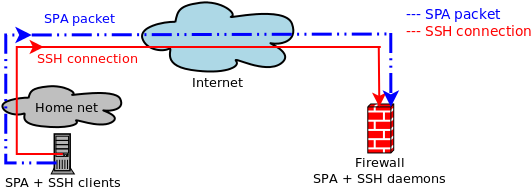
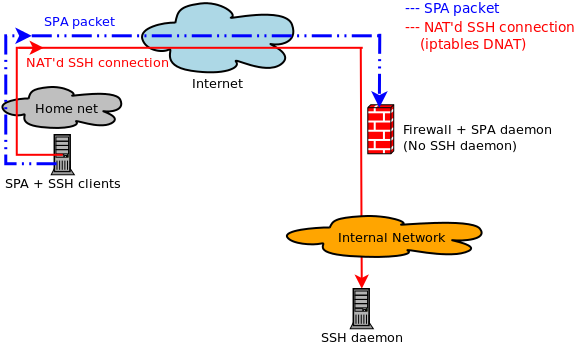
Creating Ghost Services with Single Packet Authorization Most usages of Single Packet Authorization focus on gaining access to a service such as sshd that is behind a default-drop packet filter. The point being that anyone who is scanning for the service cannot even tell that it is listening - let alone target it with an exploit or an attempt to brute force a password. This is fine, but given that firewalls such as iptables offer well designed NAT capabilities, can a more interesting access model be developed for SPA? How about accessing sshd through a port where another service (such as Apache on port 80) is already bound? Because iptables operates on packets within kernel space, NAT functions apply before there is any conflict with a user space application such as Apache. This makes it possible to create "ghost" services where a port switches for a short period of time to whatever service is requested within an SPA packet (e.g. sshd), but everyone else always just sees the service that is normally bound there (e.g. Apache on port 80).

To illustrate this concept, let's use fwknop from the spaclient system below to access sshd on the spaserver system, but request the access be granted through port 80. Further, on the spaserver system, let's verify that Apache is running and from the perspective of any scanner out on the Internet this is the only service that is accessible. That is, sshd and all other services are firewalled off by iptables. We'll assume that the spaclient system has IP 1.1.1.1, the spaserver system has IP 2.2.2.2, and the scanner system has IP 3.3.3.3.

First, let's scan the spaserver system from the scanner system and verify that only port 80 is accessible: [scanner]# nmap -P0 -n -sV 2.2.2.2

Starting Nmap 5.00 ( http://nmap.org ) at 2009-11-29 15:14 EST
Interesting ports on 2.2.2.2:
Not shown: 999 filtered ports
PORT STATE SERVICE VERSION
80/tcp open http Apache httpd 2.2.8 ((Ubuntu) mod_python/3.3.1 Python/2.5.2)

Service detection performed. Please report any incorrect results at http://nmap.org/submit/ .
Nmap done: 1 IP address (1 host up) scanned in 90.94 seconds
Good. Now, from the spaclient system, let's fire up fwknop and request access to sshd on the spaserver system. But instead of just gaining access to port 22, we'll request access to port 22 via port 80 - the fwknopd daemon will build the appropriate DNAT iptables rules to make this work: [spaclient]$ fwknop -A tcp/22 --NAT-access 2.2.2.2:80 --NAT-local -a 1.1.1.1 -D 2.2.2.2

[+] Starting fwknop client (SPA mode)...
[+] Enter an encryption key. This key must match a key in the file
/etc/fwknop/access.conf on the remote system.

Encryption Key:

[+] Building encrypted Single Packet Authorization (SPA) message...
[+] Packet fields:

Random data: 3829970026924871
Username: mbr
Timestamp: 1259526613
Version: 1.9.12
Type: 5 (Local NAT access mode)
Access: 0.0.0.0,tcp/22
NAT access: 2.2.2.2,80
SHA256 digest: Om/GsIVQIRyAp6UWyqjXVqlEQhxz+lVsQhCl1rFBfuI

[+] Sending 182 byte message to 2.2.2.2 over udp/62201...
Requesting NAT access to tcp/22 on 2.2.2.2 via port 80
With the receipt of the SPA packet, the fwknopd daemon has reconfigured iptables to allow an ssh connection through port 80 from the spaclient IP 1.1.1.1 (note the "-p 80" argument on the ssh command line): [spaclient]$ ssh -p 80 -l mbr 2.2.2.2
mbr@2.2.2.2's password:
[spaserver]$
If we can the spaserver again from the scanner system, we still only see Apache: [scanner]# nmap -P0 -n -sV 2.2.2.2

Starting Nmap 5.00 ( http://nmap.org ) at 2009-11-29 15:29 EST
Interesting ports on 2.2.2.2:
Not shown: 999 filtered ports
PORT STATE SERVICE VERSION
80/tcp open http Apache httpd 2.2.8 ((Ubuntu) mod_python/3.3.1 Python/2.5.2)

Service detection performed. Please report any incorrect results at http://nmap.org/submit/ .
Nmap done: 1 IP address (1 host up) scanned in 89.22 seconds
So, the IP 1.1.1.1 has access to sshd, but all the scanner can ever see is 'Apache httpd 2.2.8'.

A legitimate question at this point is 'why is this useful?'. Well, I have been on networks before where local access controls only allowed outbound DNS, HTTP and HTTPS traffic, so this technique allows ssh connections to be made in a manner that is consistent with these access controls. (This assumes that HTTP connections are not made through a proxy, and that the fwknopd daemon is configured to sniff SPA packets over port 53.) Further, to anyone who is able to sniff traffic, it can be hard to figure out what is really going on in terms of SPA packets and associated follow-on connections. This is especially true when other tricks such as port randomization are also applied.

I demonstrated the service ghosting technique at DojoCon a few weeks ago, and the video of this is available here (towards the end of the video).

Speaking at DojoCon

speaking at DojoCon UDPATE: The talk slides can be downloaded here and a video of the talk is available too.

On Friday November 6th I will be giving a talk on Single Packet Authorization with fwknop at the upcoming DojoCon conference at Capitol College in Laurel, MD. This talk will focus on some recent developments in the world of fwknop development and the resulting enhancements to SPA capabilities. Topics to be emphasized include:

  • The new libfko C implementation and what it means for SPA deployments.
  • Interface monitoring for administrative control changes and increasing packet counts. This adds an extra dimension of reliability for fwknopd server operations.
  • HTTP proxy support, as well as the development of an SSL web gateway for sending SPA packets on behalf of client systems that cannot construct SPA packets themselves.
  • Development efforts for future fwknop features (such as additional client integration, and deployments on embedded Linux distributions).

Software Release - fwknop-1.9.12

software release fwknop-1.9.12 The 1.9.12 release of fwknop is ready for download. This is a significant release that moves by default to the new libfko and the new FKO module for SPA encryption and decryption. Other new features include interface monitoring for the fwknopd daemon so it can survive administrative changes due to things like a DHCP address changes, and the ability to send SPA packets through HTTP proxies.

An excerpt from the 1.9.12 ChangeLog appears below:

  • Fully integrated the FKO module that is part of the libfko library for all SPA routines - encryption/decryption, digest calculation, replay attack detection, etc. The default is to always use the FKO module if it has been installed, but the original perl code remains intact as well just in case FKO does not exist on the local system. The libfko code can be viewed with Trac here
  • Added the ability to recover from interface error conditions, such as when fwknopd sniffs a ppp interface (say, associated with a VPN) that goes away and then is recreated. In previous versions of fwknop, this would result in the fwknopd daemon no longer able to receive SPA packets. This new functionality is controlled by five new configuration variables in the fwknop.conf file: ENABLE_INTF_CHECKS, INTF_CHECKS_INTERVAL, ENABLE_INTF_EXISTS_CHECK, ENABLE_INTF_RUNNING_CHECK, and ENABLE_INTF_BYTES_CHECK. By default, all of these checks are enabled and are run every 20 seconds by the knoptm daemon. If any check fails, then knoptm stops the fwknopd daemon once the error condition is corrected (such as when the interface comes back) so that knopwatchd will then restart it. The fwknopd daemon cannot receive packet data until the error condition is cleared (most likely except perhaps for the "RUNNING" check, but restarting the fwknopd daemon is better than not being able to access a service).
  • Updated the fwknop client to include the SPA destination before DNS resolution when sending an SPA packet over an HTTP request. This allows more flexible Apache configurations with virtual web hosts to function properly with HTTP requests that contain SPA packet data. Also updated the fwknop client to include a leading "/" in SPA packets over HTTP, and updated the fwknopd server to strip this out before attempting SPA packet decryption.
  • Updated the fwknop client to resolve external IP addresses (with the -R argument) here by default.
  • (Jonathan Bennett): Submitted patch to the fwknop client to add HTTP proxy support when sending SPA packets over HTTP. The result is a new --HTTP-proxy option that expects the proxy host to be given as "http://HOST", and it also supports the "http://HOST:PORT" notation as well.

Morpheus-fwknop Windows UI update

The speed at which the open source software movement develops new code is frequently quite impressive, and people crank out higher levels of production when they do something they really like to work on. This remains true for the new Morpheus-fwknop Windows UI written by Daniel Lopez, and a new release (0.7) of Morpheus is now available from Sourceforge. The release notes for 0.7 read as follows:

  • Implement PGP Encryption.
  • Allow to Open multiple port on Forward/Nat Local mode.
  • New UI with a little more color.
  • Launch an Application after sending the SPA Packet.
Here are a couple of screenshots of Morpheus in action. The look and feel has changed quite a bit from the previous release. morpheus-fwknop 0.7 morpheus-fwknop 0.7

Software Releases - libfko and morpheus-fwknop

libfko and morpheus-fwknop This past week one a good one for Single Packet Authorization with two software releases. First, an initial version of libfko, the all C implementation of SPA developed by Damien Stuart can be downloaded along with documentation. The libfko library allows other programs to easily implement the SPA protocol, and a new C client is bundled with fwknop-c-0.62 as well as a new perl module "FKO" that implements a perl XS extension of libfko functions. Once the fwknopd server piece is also developed (a new replacement fwknop C client is included, but not a replacement for fwknopd yet), the libfko code will allow SPA to easily be extended to systems where perl is either not installed or cannot be run (due to hardware constraints such as small routers running OpenWRT).

fwknop-c follows the standard autoconf method of installing open source software, so just: $ ./configure --prefix=/usr && make
$ su
# make install
The new fwknop-c client can be found at /usr/bin/fwknop once you have installed per the above, and all important options are supported similarly to the perl fwknop client. So, the familiar commands like: $ fwknop -A tcp/22 -R -D <host_or_ip> should work just the same. A few of the command line arguments have been changed in the C version, and by default the output on stdout is reduced (just use -v to change this).

Second, a new project called morpheus-fwknop was developed and released by Daniel Lopez. This project is a Windows UI written in .NET to send SPA packets that fwknopd can decrypt. With morpheus-fwknop, there is no need to install Cygwin in order to access services protected by SPA from Windows. This is the first viable UI to succeed Sean Greven's UI developed in Delphi (which still works too!), and morpheus-fwknop is released under the GPL. Naturally, source code can be downloaded, and here are two screenshots that show the look and feel: morpheus-fwknop in action morpheus-fwknop in action It is excellent to see work going on in the world of user interfaces to fwknop and SPA. Without an effective UI on Windows, a large user base is effectively cut off.

OpenSSH Vulnerability Rumor

Protect OpenSSH with fwknop UPDATE: 08/07/09 So, Defcon 17 has come and gone, and I have not heard anything credible to indicate there is a new vulnerability in OpenSSH. That said, I still run all of my SSH daemons behind SPA/fwknop. My original post appears below.

There are rumors of a new vulnerability in OpenSSH that may affect several versions previous to the current OpenSSH-5.2 release. IF these rumors are true - and there is a claim that details will be provided in time for the upcoming Black Hat and Defcon conferences three weeks from now - then it may be a good idea to deploy either a port knocking or SPA solution to protect SSH daemons. Although solid proof has yet to be released, it is a good bet that if there really is a remotely exploitable vulnerability, then it will have nothing to do with brute force password guessing.

Although log parsers that wrap thresholds around failed login attempts can be useful, what I worry about are vulnerabilities where password guessing is completely unnecessary for successful compromises. This is where SPA comes in because it makes a service essentially impossible to identify via scans, and so when an attacker (who may be armed with a 0-day exploit) goes looking for SSH servers to attack, your server will not be listed. There have been remote exploits against OpenSSH before that allow arbitrary code execution, and password guessing was nowhere in sight. It is only a matter of time before the next one is found (hopefully by the whitehats first) in OpenSSH or any other SSH implementation that you are running.

In the meantime, perhaps the Metasploit framework will come up with an exploit before Black Hat. Or, perhaps this will always stay as just a rumor. Either way, there is little harm in protecting your SSH daemon behind SPA and a default-drop firewall policy.

Presentation on Single Packet Authorization at ENSOL

SPA at ENSOLOn June 19th Leandro Almeida gave a presentation entitled "Single Packet Authorization - Increasing the security in SSH" at the ENSOL conference in João Person, Brazil. ENSOL is an open source conference that goes by the title "Freedom in the Extreme", and given that Brazil is highly supportive of Linux, I'm sure that it is a good conference. Leandro has posted an English translation of his slides here. It is good to see some additional presentations on the SPA concept at open source conferences, and Leandro emphasizes the usage of the fwknop SPA implementation to protect SSH.

Single Packet Authorization and Amazon's Elastic Cloud (EC2) Service

Digg Single Packet Authorization on Amazon EC2 SPA for Amazon EC2 service Recently on the fwknop mailing list, Mark V asked whether Single Packet Authorization is compatible with virtual Linux instances in Amazon's Elastic Cloud (EC2) computing service. After signing up for an account and running a few tests, it turns out that fwknop can function properly on an EC2 instance and wrap an SPA hardening layer around SSHD. The Amazon online documentation on how to access Linux instances over SSH recommends adding new rules for each IP source address you want to use to access SSHD, which can become tiresome if you are on a network running DHCP. With fwknop, you don't need to do any such thing - you can access SSHD via SPA from anywhere, and anyone else scanning for SSHD on the instance can't even tell that it is listening.

To re-create the steps listed in this blog post, it is necessary to have signed up for an EC2 account and to have created an SSH keypair so that instances can be launched from the command tools provided by Amazon. For this post, all commands on the fwknop client side are executed on an Ubuntu 8.04 system to gain access into the Amazon cloud.

First, let's launch a new virtual instance of Fedora 8 (the command ec2-describe-images -o self -o amazon can be used to find instance identifiers for Fedora 8 systems):
[ubuntu]$ ec2-run-instances ami-abcd1234 -k cdyne-keypair
RESERVATION    r-abcd1234   111111114274    default
INSTANCE       i-abcd1234   ami-abcd1234    pending cdyne-keypair   0
m1.small       2008-11-07T20:18:43+0000     us-east-1c   aki-abcd1234
ari-abcd1234

[ubuntu]$ ec2-describe-instances i-abcd1234
RESERVATION     r-abcd1234  111111114274    default
INSTANCE        i-abcd1234  ami-abcd1234
ec2-70-100-249-20.compute-1.amazonaws.com
domU-12-31-00-00-00-00.compute-1.internal   running cdyne-keypair   0
m1.small        2008-11-07T20:18:43+0000    us-east-1c   aki-abcd1234
ari-abcd1234
Now, we allow SSH access temporarily from the Ubuntu IP address (which will be managed by fwknop after we get it installed and set up instead). We also allow all UDP packets over port 62201 through from any IP since this is the default port and protocol used by fwknop to send SPA packets, and we need such packets to reach far enough into the cloud so that it will be seen by the fwknopd sniffer running on the Fedora 8 instance:
[ubuntu]$ ec2-authorize default -p 22 -s 123.1.1.1/32
GROUP       default
PERMISSION  default ALLOWS  tcp  22  22  FROM  CIDR  123.1.1.1/32

[ubuntu]$ ec2-authorize default -P udp -p 62201
GROUP       default
PERMISSION  default ALLOWS  udp  62201  62201
We can now log into the instance as root:
[ubuntu]$ ssh -i cdyne-keypair root@ec2-70-100-249-20.compute-1.amazonaws.com
The authenticity of host 'ec2-70-100-249-20.compute-1.amazonaws.com
(70.100.249.20)' can't be established.
RSA key fingerprint is 2a:aa:aa:c9:6f:aa:aa:aa:a0:48:7d:db:d6:aa:aa:aa.
Are you sure you want to continue connecting (yes/no)? yes
Warning: Permanently added 'ec2-70-100-249-20.compute-1.amazonaws.com,
70.100.249.20' (RSA) to the list of known hosts.

         __|  __|_  )  Fedora 8
         _|  (     /    32-bit
        ___|\___|___|

 Welcome to an EC2 Public Image
                       :-)
    Base

 --[ see /etc/ec2/release-notes ]--
We have a shiny new EC2 instance running Fedora 8. For fwknop to run properly, we'll need the perl-devel and libpcap-devel packages installed, and then we'll install fwknop (some output below has been abbreviated) and configure the /etc/fwknop/access.conf file for SPA access to SSHD. We also add iptables rules to allow packets that are part of established connection through, and drop all other attempts to communicate with SSHD. Finally, we start fwknopd: [root@domU-12-31-00-00-00-00 ~]# yum install perl-devel libpcap-devel
[root@domU-12-31-00-00-00-00 ~]# cd /usr/local/src/
[root@domU-12-31-00-00-00-00 src]# wget http://www.cipherdyne.org/fwknop/download/fwknop-1.9.9-pre7.tar.gz
[root@domU-12-31-00-00-00-00 src]# tar xfz fwknop-1.9.9-pre7.tar.gz
[root@domU-12-31-00-00-00-00 src]# cd fwknop-1.9.9-pre7
[root@domU-12-31-00-00-00-00 fwknop-1.9.9-pre7]# ./install.pl
[...]
[+] It appears that the following network interfaces are attached to the
system:
eth0
lo
Which network interface would you like fwknop to sniff packets from? eth0

[root@domU-12-31-00-00-00-00 ~]# cat > /etc/fwknop/access.conf
SOURCE: ANY;
OPEN_PORTS: tcp/22;
KEY: thisisatestkey;
FW_ACCESS_TIMEOUT: 30;

[root@domU-12-31-00-00-00-00 ~]# iptables -F
[root@domU-12-31-00-00-00-00 ~]# iptables -A INPUT -m state --state ESTABLISHED,RELATED -j ACCEPT
[root@domU-12-31-00-00-00-00 ~]# iptables -A INPUT -p tcp --dport 22 -j DROP
[root@domU-12-31-00-00-00-00 ~]# /etc/init.d/fwknop start
Starting fwknopd:       [ OK ]
In the installation of fwknop above, we selected eth0 as the Ethernet interface that fwknopd sniffs for SPA packets, and then we configured the /etc/fwknop/access.conf file with a symmetric key for SPA access to SSHD over TCP port 22. Also, with iptables now deployed to drop SSH communications, we cannot even see that SSHD is listening under an nmap scan:
[ubuntu]$ nmap -P0 -p 22 -sT ec2-70-100-249-20.compute-1.amazonaws.com

Starting Nmap 4.53 ( http://insecure.org ) at 2008-11-08 01:33 EST
Interesting ports on ec2-70-100-249-20.compute-1.amazonaws.com
(70.100.249.20):
PORT   STATE    SERVICE
22/tcp filtered ssh
This is where fwknop comes in. After running the fwknop client and typing the shared encryption key, we can now access the Fedora 8 instance with SSH:
[ubuntu]$ fwknop -A tcp/22 -a 123.1.1.1
-D ec2-70-100-249-20.compute-1.amazonaws.com

[+] Starting fwknop client (SPA mode)...
[+] Resolving hostname: ec2-70-100-249-20.compute-1.amazonaws.com
[+] Enter an encryption key. This key must match a key in the file
    /etc/fwknop/access.conf on the remote system.

Encryption Key:

[+] Building encrypted Single Packet Authorization (SPA) message...
[+] Packet fields:

        Random data:    9189958885117496
        Username:       mbr
        Timestamp:      1226119984
        Version:        1.9.9-pre7
        Type:           1 (access mode)
        Access:         123.1.1.1,tcp/22
        SHA256 digest:  EPOjHE2ANS3Fe3MHxDpok13qHDGbYziFiohv6CyHQXs

[+] Sending 161 byte message to 70.100.249.20 over udp/62201...

[ubuntu]$ ssh -i cdyne-keypair root@ec2-70-100-249-20.compute-1.amazonaws.com

         __|  __|_  )  Fedora 8
         _|  (     /    32-bit
        ___|\___|___|

 Welcome to an EC2 Public Image
                       :-)
    Base
In his original post, Mark had suggested a tighter level of integration with Amazon's EC2 service by building in some notion of instance identifiers into SPA communications. With the basic network access now validated and SPA in its raw form demonstrated to be compatible with EC2, additional integration points can be achieved. Incidentally, port knocking would also be compatible with the EC2 service, but I would not recommend using it because port knocking would look like a port scan to any IDS that Amazon may have deployed to monitor the cloud network. With SPA, only a single packet with an encrypted payload is involved, and this is unlikely to trigger an IDS alarm.

Visualizing SPA Packet Randomness

fwknop SPA packet randomness A key advantage to using Single Packet Authorization (SPA) over port knocking is the fact that it is trivially easy to harden SPA packets against replay attacks by including a significant number of random bytes within each SPA packet. Then, by tracking the SHA-256 message digest (or the digest from some other suitable cryptographic hashing algorithm) for all incoming SPA packets, the server can enforce that only unique SPA packets ever result in elevated access through a default-drop firewall policy. Any duplicate SPA packet will match a previously calculated digest, and such a packet is therefore flagged as a replay attack (subject to the usual concerns surrounding the minuscule chance of a hash collision - though for SHA-256 this is exceedingly unlikely). In the case of SPA packets generated by the fwknop client, a full 16 bytes of random data is included at the beginning of each packet before it is encrypted.

Another benefit of randomizing SPA packet data - beyond thwarting replay attacks - is that it becomes more difficult to write signatures for intrusion detection systems to detect SPA traffic. The structure of SPA packets generated by the fwknop client is designed to minimize sections that remain the same from one invocation of the client to the next - such identifying sections could be used to write Snort rules to detect fwknop SPA packets. This blog post contains examples of such Snort rules which look for the base64-encoded versions of the string "Salted__" or the hex bytes "0x8502" at the very beginning of UDP packets over port 62201 (the default port used by fwknop). There is also a rule to look for trailing '=' characters at the end of such packets in order to detect the marker used by base64 encoding when the length of the original data is not a multiple of four. These predictable bytes are artifacts of the Crypt::CBC module, GnuPG, or base64 encoding itself, but any recent release of fwknop strips these bytes out of SPA packets before sending them on the wire. The fwknopd server adds them back in if necessary before attempting to base64 decode and decrypt incoming SPA packets.

So, given that fwknop uses CBC mode for symmetric encryption and random bytes are at the very beginning of the payload data, one would expect that SPA packets from fwknop - when viewed via a sniffer - are essentially random variations of base64-encoded data, correct? And this should remain true across all SPA packets that are encrypted with the same encryption key, and even across the same access requests?

Let's see how close fwknop gets to this...

What we need to see is the distribution of byte values across each byte position in a large sampling of SPA packets. That is, for the first byte in each packet across our sample, can we find a relation to any of the other first bytes in the other packets? This process needs to be repeated across all bytes in every packet. To rigorously test for randomness properties we could also get more sophisticated and use the NIST Statistical Test Suite, but for now we'll just focus on using Gnuplot to visualize the byte distribution across two sets of 20,000 SPA packets. If Gnuplot shows any recognizable features or relationships across our sample sets, then we know that we have more work to do. For reference, if you want to duplicate the analysis in this blog post or perform your own analysis of the SPA packet data sets (20,000 packets each), you can download them.

We need two capabilities: 1) the ability to automatically generate 20,000 SPA packets with the fwknop client and store them in a file (one packet to a line), and 2) the ability to parse the file and count the number of different characters in each byte position across all 20,000 SPA packets and print this data to a file so that it can be graphed. These goals are accomplished with this patch to fwknop (which adds a new command line argument --Save-packet-append to be released in fwknop-1.9.8) and this script base64_byte_frequency.pl respectively.

Now, let's collect the first set of 20,000 SPA packets. Each packet is encrypted in this case with the Rijndael cipher, and we use the --Include-salted and --Include-equals command line arguments to produce SPA packets that are compatible with older fwknopd servers: [spaclient]$ for ((i=1;i<=20000;i+=1)); do fwknop -A tcp/22 -a 127.0.0.1 -D 127.0.0.1 --Save-packet --Save-packet-file spa_artifacts.pkts --Save-packet-append --get-key spa.pw --Include-salted --Include-equals > /dev/null; echo $i; done
1
2
3
...
19998
19999
20000
[spaclient]$ head -n 2 spa_artifacts.pkts
U2FsdGVkX1/s7OmvQtYk9UnQuGg8htJ+19pru9NdhflmGhS9d/9fFET7jnPKWsk3/lnd CbGprkkUBkEYXNORP8RU8ZhkCS+pexZ2J+FbQzmwiuD7/9nA1DAmBGnUQi7mLyZYtOGm iCa8yL9IaP43DVhMflAEf+tQGaPw5xUd2/0=
U2FsdGVkX18NuTMq50ef6hjD0t16ZUnKrVYjirVW81UIRNDfclS812vZAWTdcio8t3GC QVxZz/uwrJsjkzevD0OhxJhba+CQVeKuJpfUOhskDQMtYDcH2hkGeDRK9Oc6AfLjO5Fd JXxBJuf8pmxfLC2iWkfAfooCJpjkOm+afH4=
All of the SPA packets generated by the command above are written to the file spa_artifacts.pkts, and now let's execute the base64_byte_frequency.pl script against it. This script will create two new files spa_artifacts.pkts.2d and spa_artifacts.pkts.3d for graphing in two and three dimensions. The 2D file contains a simple count of each base64 encoded character, and the 3D file contains a count of each character at each position in the collection of SPA packets. We'll use Gnuplot to graph this data as follows: [spaclient]$ ./base64_byte_frequency.pl spa_artifacts.pkts
[+] Parsing SPA packets from: spa_artifacts.pkts...
[+] Writing 2D results to: spa_artifacts.pkts.2d...
[+] Writing 3D results to: spa_artifacts.pkts.3d...
[spaclient]$ cat > spa_artifacts_2d.gnu
reset
set title "2D SPA packet randomness (artifacts included)"
set terminal png transparent nocrop enhanced
set output "spa_artifacts_2d.png"
set xlabel "char"
set ylabel "frequency"
plot 'spa_artifacts.pkts.2d' using 1:2 with lines title '(char,freq)'
[spaclient]$ cat > spa_artifacts_3d.gnu
reset
set title "3D SPA packet randomness (artifacts included)"
set terminal png transparent nocrop enhanced
set output "spa_artifacts_3d.png"
set xlabel "position"
set ylabel "char"
set zlabel "frequency"
set view 72,9
splot 'spa_artifacts.pkts.3d' using 1:2:3 with points title '(pos,char,freq)'
[spaclient]$ gnuplot spa_artifacts_3d.gnu
[spaclient]$ gnuplot spa_artifacts_2d.gnu
[spaclient]$ ls -atlr *png
-rw-r--r-- 1 mbr mbr 5977 2008-09-14 09:31 spa_artifacts_2d.png
-rw-r--r-- 1 mbr mbr 4194 2008-09-14 09:31 spa_artifacts_3d.png
The last two lines above indicate that Gnuplot has created two graphics files spa_artifacts_2d.png and spa_artifacts_3d.png for plotting the data in two and three dimensions. Because we're graphing base64 characters as integer data, the base64_byte_frequency.pl script maps each base64 character to numerically ordered values beginning at zero. We could have just graphed the hex value of each character directly, but this would result in gaps. For reference, the base64 alphabet is described by the following characters (in order): +, /, 0-9, A-Z, a-z. There is also the equals "=" character, but it is only used as a closing marker. So, the base64_byte_frequency.pl script maps "+" to 0, "/" to 1, "0-9" to 1-11, "A-Z" to 12-37, "a-z" to 38-63, and "=" to 64.

Here is the 2-dimensional graph that Gnuplot has produced: 2D SPA byte frequencies with Salted__ prefix You can see in the graph above that there are several spikes for a few character values. These spikes correspond with the characters U2FsdGVkX1, which is the base64 encoded version of the string "Salted__". Every SPA packet in the spa_artifacts.pkts file begins with this string, and so one would expect more of these characters on average than the others. There is also a sharp dip to 20,000 on the right-hand portion of the graph for the value 64, which corresponds to the = character. This is because there is only one equals character at the end of each SPA packet in the spa_artifacts.pkts file.

Because base64 encoding uses an alphabet of 64 characters, and given that our sample size is 20,000 packets of 171 bytes each (less the ending = marker), we would expect the average number of times each character is represented to be 171 / 64 * 20000 = 53,000 (approximately). That is, we can expect this value if the SPA packets are perfectly random across the sample set. The spikes in the 2D graph throw this expected value off a bit.

Now let's take a look at the 3-dimensional plot of the same data: 3D SPA byte frequencies with Salted__ prefix This graph shows us where the predictable bytes are. We know that each SPA packet begins with U2FsdGVkX1 and ends with =, and the outliers (on the left-hand side and one point on the right-hand side - all with Z-axis values of about 20,000) in the above graph illustrate this. The X-axis represents the byte positions of each packet, the Y-axis are the numeric character codes, and the Z-axis is the number of times a character is counted.

So, given that any recent release of fwknop removes the "Salted__" prefix and any trailing "=" characters, are the graphs of such SPA packets now highly randomized?

The answer is "almost".

Let's produce the same two graphs, but this time for SPA packets produced by any recent version of fwknop (without using the --Include-salted or --Include-equals command line arguments). [spaclient]$ for ((i=1;i<=20000;i+=1)); do fwknop -A tcp/22 -a 127.0.0.1 -D 127.0.0.1 --Save-packet --Save-packet-file spa_no_artifacts.pkts --Save-packet-append --get-key spa.pw > /dev/null; echo $i; done
1
2
3
...
19998
19999
20000
[spaclient]$ head -n 2 spa_no_artifacts.pkts
/ZlXox6SyQsyMpKVj+cxHlmSpMWOaAyxmou5LgThZ58yXlxFrR7BGtqSRJJTELrUgJ2/ RiX9If+NLXEANJSu9nogO8ZG2R6cllQlhT1vM6YiLsktujuV3a7r81I1JSCwC4YZdNQC Y2xwcRGLMEEhykGhp0RKEYlSo
8jX5NECzw4NGVg3LIEhu30ph0uvBa4ijW9/S7IQEQvdj/IPHle8KRoeyHvskj1fd0XU7 beUIb5zCKsFq7NTTUsnwaccULAKQHZz4Qm0ZTVC8st0doDfhU5Bl46LbDXPCejRbSQEd cVgwDwaU8XqEKr8kYjXZ3ZNGA
The 2-dimensional graph looks pretty good: 3D SPA byte frequencies without Salted__ prefix Now that the invariant sections have been removed, the length of each packet is 161 characters, so if the randomness were perfect, we would expect the average instance of each character to be 161 / 64 * 20000 = 50,300 (approximately), and this is quite close to the value displayed by the graph. There are still two minor spikes corresponding to the numeric values around 0 and 1, and then again around 10 and 11 on the X-axis. These bytes correspond to the characters +, /, 8, and 9 respectively.

Let's look at the 3-dimensional graph to see if we can get a sense of where these spikes are in terms of byte positions within the SPA packets: 3D SPA byte frequencies without Salted__ prefix So, at the scale shown above, the 3D graph looks decently random - at least there are far fewer outliers than for the first data set of 20,000 packets, and there aren't any other obviously regular structures in the graph. However, if you look to the left-hand portion of the graph, you will see there are small outliers at position 0 on the X-axis - the very first byte of each SPA packet. Looking through the spa_no_artifacts.pkts file, the graph is indeed correct - every SPA packet begins with one of the bytes +, /, 8, or 9.

Why?

The reason is that the current fwknop client code strips the string U2FsdGVkX1 from each SPA packet after the raw encrypted data is base64 encoded, and the encoding itself uses +, /, 8, or 9 after the last "_" in the string "Salted__". Although this is not huge problem, it does mean that it is possible to write a Snort rule that uses a PCRE to look for one of these bytes at the very beginning of UDP payload data. This will be fixed in a future release of fwknop.

The techniques illustrated in this blog post can be applied to SPA packets generated by other implementations as well. Some SPA implementations use a hashed payload instead of an encrypted payload which implies that multiple requests for the same access through a firewall will look quite similar in many byte positions, so it is much easier to detect such SPA packets with signatures in an intrusion detection system. By contrast, the SPA packets produced by fwknop are much harder to write reliable signatures for effective detection in any IDS - particularly when combined with the port randomization features offered in recent releases.

Finally, this blog post has only addressed the randomness characteristics of SPA packets that have been encrypted with the Rijndael cipher. An upcoming blog post will perform the same analysis for SPA packets encrypted with GnuPG.