Software Release - fwknop-2.0.4
09 December, 2012
 The 2.0.4 release of fwknop is
available for download. This release
includes new support for fuzzing the SPA protocol powered by the perl FKO module along
with a set of patches designed to break libfko in subtle ways, and also includes several
bug fixes and small enhancements. Among the most important of these include a new check
for fwknop chains on iptables firewalls after the initial fwknopd start up (so the fwknop
chains can be deleted out from under the fwknop daemon without affecting SPA operations),
and a new 'upstart' config for systems running the upstart daemon. Many other changes
were contributed by the open source community, and these are acknowledged in the complete
fwknop-2.0.4 ChangeLog below:
The 2.0.4 release of fwknop is
available for download. This release
includes new support for fuzzing the SPA protocol powered by the perl FKO module along
with a set of patches designed to break libfko in subtle ways, and also includes several
bug fixes and small enhancements. Among the most important of these include a new check
for fwknop chains on iptables firewalls after the initial fwknopd start up (so the fwknop
chains can be deleted out from under the fwknop daemon without affecting SPA operations),
and a new 'upstart' config for systems running the upstart daemon. Many other changes
were contributed by the open source community, and these are acknowledged in the complete
fwknop-2.0.4 ChangeLog below:
- [client] Misc fixes and the addition of save_args and last command (.fwknop.last) support on the Windows platform.
- [client] Fixed bug in username determination code where a valid value could be overrwritten in certain circumstances.
- [server] Added upstart config at extras/upstart/fwknop.conf. This allows the fwknopd to easily be managed with upstart via commands like "service fwknop start" and "service fwknop stop".
- [server] (Vlad Glagolev) Submitted a patch to fix ndbm/gdbm usage when --disable-file-cache is used for the autoconf configure script. This functionality was broken in be4193d734850fe60f14a26b547525ea0b9ce1e9 through improper handling of #define macros from --disable-file-cache.
- [server] (Vlad Glagolev) Submitted a patch to fix command exec mode under SPA message type validity test. Support for command exec mode was also added to the test suite.
- (Vlad Glagolev) Submitted an OpenBSD port for fwknop-2.0.3, and this has been checked in under the extras/openbsd/ directory.
- [server] Bug fix to allow GPG_ALLOW_NO_PW to result in not also having to specify a Rijndael key.
- [Android] Added new .properties files to allow the fwknop client to build and function properly on the latest Android release (4.1.2).
- [client] Added '-P udpraw' to allow the client to send SPA packets over UDP with a spoofed source IP address. This is in addition to the original 'tcpraw' and 'icmp' protocols that also support a spoofed source IP.
- [libfko] Bug fix to check b64_decode() return value to ensure that non-base64 encoded data is never used. Even though other validation routines checked decoded results, it is important to discard invalid data as early as possible. Note too that such invalid data would only be provided to b64_decode() after proper decryption, so the client must provide authentic SPA data.
- [libfko] Added validation of NAT access strings in the various NAT modes.
- [libfko] Restricted usernames embedded in SPA packets to be alpha-numeric along with "-" chars.
- [client] (Franck Joncourt) Contributed a patch to allow the fwknop client to be stopped during the password entry prompt with Ctrl-C before any SPA packet is sent on the wire.
- [client+server] Applied patch from Franck Joncourt to remove unnecessary chmod() call when creating client rc file and server replay cache file. The permissions are now set appropriately via open(), and at the same time this patch fixes a potential race condition since the previous code used fopen() followed by chmod().
- [server] Bug fix to accept SPA packets over ICMP if the fwknop client is executed with '-P icmp' and the user has the required privileges.
- [test suite] Applied patch from Franck Joncourt to have the perl FKO module link against libfko in the local directory (if it exists) so that it doesn't have to have libfko completely installed in the /usr/lib/ directory. This allows the test suite to run FKO tests without installing libfko.
- [test suite] Significant update to include a set of fuzzing SPA packets that are built using a patched version of libfko. These packets are located in the test/fuzzing/bogus_spa_packets file, and are designed to ensure proper validation of SPA packet data. This validation is performed in --enable-perl-module-checks mode via the perl FKO module.
- [client] Added --icmp-type and --icmp-code arguments so the user can control the icmp type/code combination for spoofed SPA packets ('-P icmp') mode.
- [client] Updated default TTL value to 64 for spoofed SPA packets. This is closer to more OS default TTL values than the previous 255.
- Updated build CFLAGS and LDFLAGS to conform to the Debian hardening-includes file for PIE support (e.g. '-fPIE' for CFLAGS and '-fPIE -pie' for LDFLAGS).
- [test suite] For GnuPG tests that require a passphrase associated with a gpg key, added a pinentry check to see if the local gpg engine requires it. If so, the gpg test that require a key are excluded since.
- [server] Added a new '--pcap-file <file>' option to allow pcap files to be processed directly by fwknopd instead of sniffing an interface. This feature is mostly intended for debugging purposes.
- [server] Added chain_exists() check to SPA rule creation so that if any of the fwknop chains are deleted out from under fwknopd they will be recreated on the fly. This mitigates scenarios where fwknopd might be started before a system level firewall policy is applied due to init script ordering, or if an iptables policy is re-applied without restarting fwknopd.

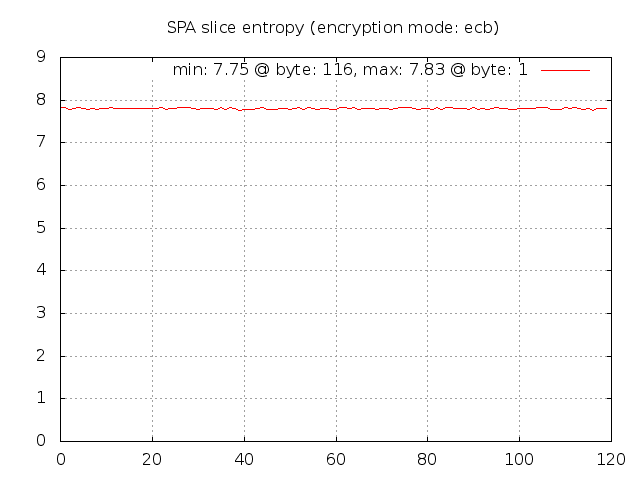
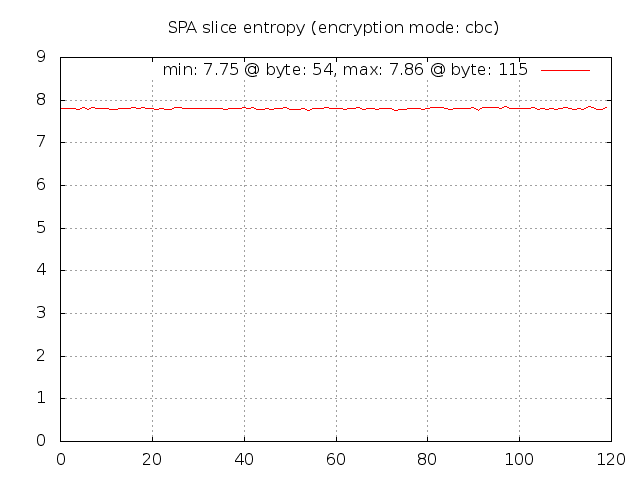 Given this graph, it is apparent that Rijndael comes pretty close to producing data that looks
quite random across every byte position and there are no significant outliers. Now, let us run
the spa-entropy.pl script in --gpg mode in order to instruct the fwknop client to generate
SPA packets that are encrypted with GnuPG:
Given this graph, it is apparent that Rijndael comes pretty close to producing data that looks
quite random across every byte position and there are no significant outliers. Now, let us run
the spa-entropy.pl script in --gpg mode in order to instruct the fwknop client to generate
SPA packets that are encrypted with GnuPG:
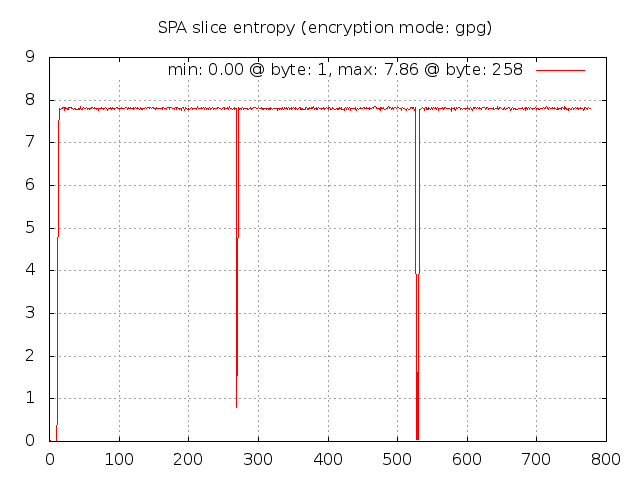 Wow, it is immediately apparent that there is something quite different about the measured entropy
for GnuPG SPA packets. There are three areas of interest: 1) the first four bytes, 2) two
bytes or so around byte 275, and 3) four bytes around byte 525. Why does the entropy fall
off so drastically at these locations? The first region is most likely an artifact of the
usage of the same GnuPG key across all SPA packets along with the fact that the fwknop client
only strips off the first two bytes if they match the string "hQ" in the base64 encoded SPA
data. This string corresponds to the same values that the /etc/magic database
provides to the file command - it is the same across all GnuPG encrypted data regardless
of which keys are used. But, the next four bytes aren't as predictable, and must vary from
key to key so the fwknop client can't use a simple strategy of removing these bytes before an
SPA packet is placed on the wire. (The whole reason for removing the bytes in the first place
is to make it slightly more difficult to write a simplistic Snort signature for SPA packet
detection.) The next two regions can be explained by the fact that the OpenPGP protocol
(see:
Wow, it is immediately apparent that there is something quite different about the measured entropy
for GnuPG SPA packets. There are three areas of interest: 1) the first four bytes, 2) two
bytes or so around byte 275, and 3) four bytes around byte 525. Why does the entropy fall
off so drastically at these locations? The first region is most likely an artifact of the
usage of the same GnuPG key across all SPA packets along with the fact that the fwknop client
only strips off the first two bytes if they match the string "hQ" in the base64 encoded SPA
data. This string corresponds to the same values that the /etc/magic database
provides to the file command - it is the same across all GnuPG encrypted data regardless
of which keys are used. But, the next four bytes aren't as predictable, and must vary from
key to key so the fwknop client can't use a simple strategy of removing these bytes before an
SPA packet is placed on the wire. (The whole reason for removing the bytes in the first place
is to make it slightly more difficult to write a simplistic Snort signature for SPA packet
detection.) The next two regions can be explained by the fact that the OpenPGP protocol
(see: 
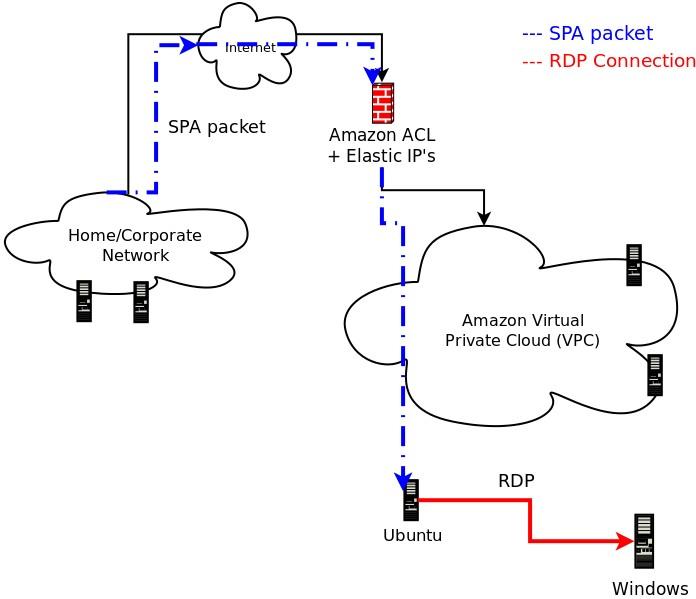 .
.

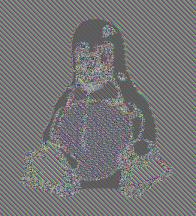
 Well, that still looks pretty good. Revisiting the ECB encrypted image of Tux above
for a moment - the reason that the Tux outline can be seen in the encrypted version
is that in the JPG image file there must be identical blocks in multiple locations
to represent the solid black regions. These blocks are all encrypted in the same
way by AES in ECB mode, so the outline persists. But, this is one instance of ECB
encryption against a file that has multiple identical blocks. For the encrypted SPA
packets, we're dealing with 1,000 separate instances of encrypted data (all with the
same key). Across this data set there are certainly lots of identical plaintext
blocks (all of the SPA packets request access for source IP 127.0.0.2 to destination
port tcp/22 for example), but the encrypted data still shows a high level of entropy.
This source of entropy is provided by the random salt values that are used to
generate the initialization vector and final encryption key for each encrypted SPA
packet. As proof, if we apply the following patch to force the salt to zero for all
SPA packets (of course, one would not want to use this patch in practice):
Well, that still looks pretty good. Revisiting the ECB encrypted image of Tux above
for a moment - the reason that the Tux outline can be seen in the encrypted version
is that in the JPG image file there must be identical blocks in multiple locations
to represent the solid black regions. These blocks are all encrypted in the same
way by AES in ECB mode, so the outline persists. But, this is one instance of ECB
encryption against a file that has multiple identical blocks. For the encrypted SPA
packets, we're dealing with 1,000 separate instances of encrypted data (all with the
same key). Across this data set there are certainly lots of identical plaintext
blocks (all of the SPA packets request access for source IP 127.0.0.2 to destination
port tcp/22 for example), but the encrypted data still shows a high level of entropy.
This source of entropy is provided by the random salt values that are used to
generate the initialization vector and final encryption key for each encrypted SPA
packet. As proof, if we apply the following patch to force the salt to zero for all
SPA packets (of course, one would not want to use this patch in practice):
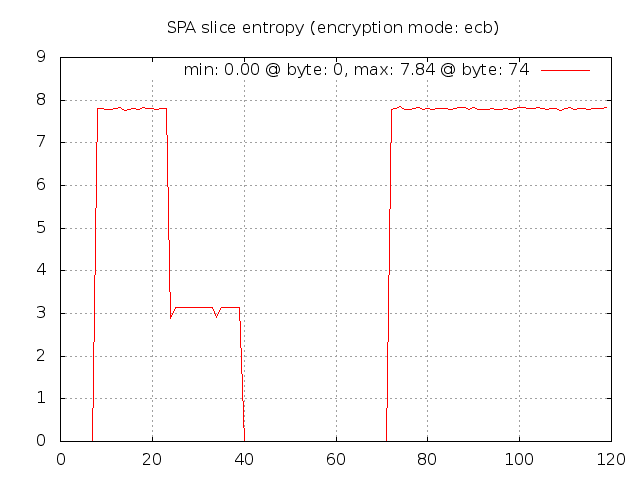 Now we can easily see where there are identical blocks across the SPA packet data set. The first
eight bytes contains the salt, so these are all zero (note that fwknop strips the
usual "Salted__" prefix before transmitting an SPA packet on the wire). The next
16 bytes are the random bytes that fwknop includes in every SPA packet so these bytes
have high entropy. Next up are the username and timestamp - the later changes with
each second, so there is some entropy there since it takes a few seconds to create the
1,000 SPA packet data set. Then the entropy goes back to zero with the next fields
and there isn't any decent entropy until the final message digest.
Now we can easily see where there are identical blocks across the SPA packet data set. The first
eight bytes contains the salt, so these are all zero (note that fwknop strips the
usual "Salted__" prefix before transmitting an SPA packet on the wire). The next
16 bytes are the random bytes that fwknop includes in every SPA packet so these bytes
have high entropy. Next up are the username and timestamp - the later changes with
each second, so there is some entropy there since it takes a few seconds to create the
1,000 SPA packet data set. Then the entropy goes back to zero with the next fields
and there isn't any decent entropy until the final message digest.
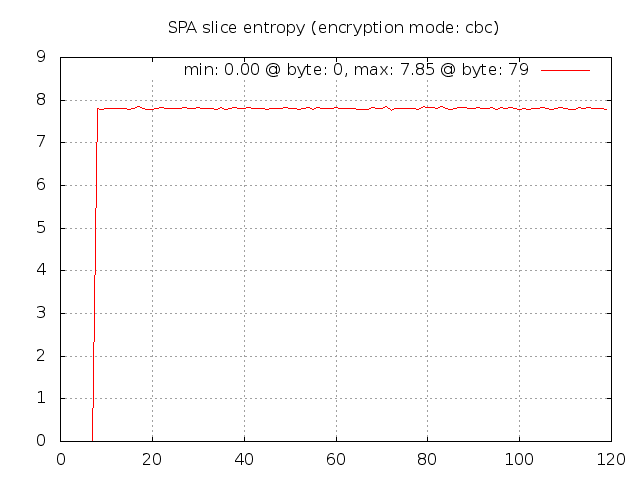 In CBC mode, the random data included by the fwknop client now results in decent entropy
even though the salt is zero. This is because every ciphertext block in CBC mode
depends on all previous plaintext blocks, so randomness in one plaintext block implies
that every subsequent encrypted block will look different from one SPA packet to the
next. This graphically shows that CBC mode is a better choice for strong security.
Now, if the pseudo random number generator on the local operating system is poorly
implemented, this will negatively impact ciphertext entropy regardless of the encryption
mode, but still CBC mode is a better alternative than ECB mode.
In CBC mode, the random data included by the fwknop client now results in decent entropy
even though the salt is zero. This is because every ciphertext block in CBC mode
depends on all previous plaintext blocks, so randomness in one plaintext block implies
that every subsequent encrypted block will look different from one SPA packet to the
next. This graphically shows that CBC mode is a better choice for strong security.
Now, if the pseudo random number generator on the local operating system is poorly
implemented, this will negatively impact ciphertext entropy regardless of the encryption
mode, but still CBC mode is a better alternative than ECB mode.